What the Crafter is
The Crafter is a redstone block that runs a crafting recipe on its own. It looks like a chunky 3×3 grid built into iron and stone, with a glowing eye on the front face. You set up the ingredients inside its slots, send it a redstone pulse, and it ejects the finished item out the side the eye is pointing at.
Mojang shipped the Crafter in Java Edition 1.21 and Bedrock 1.21.0, both part of the Tricky Trials update from June 2024. Before it existed, players faked auto-crafting with droppers and complicated mob loops that never actually crafted anything. The Crafter does the real thing: a recipe check, every time it’s triggered, with the same rules as a normal crafting table.
If you can make an item by hand at a crafting table, you can make that item automatically with a Crafter. That’s the short version. The rest of this guide covers how to build it, how to wire it up, and how to use the slot-disable feature that makes it actually useful.
How to craft a Crafter
You’ll need a small stack of mid-game materials before you can build one:
- 5 iron ingots
- 2 redstone dust
- 1 dropper
- 1 crafting table
Place them on a crafting table in this pattern:
- Top row: three iron ingots
- Middle row: redstone, crafting table, redstone
- Bottom row: iron, dropper, iron
That gives you one Crafter. Because the recipe needs five iron ingots and a dropper, this is firmly a mid-game block. You can’t build one until you’ve already mined some iron and have a working crafting table and dropper.
How the Crafter works
Right-click the Crafter to open its menu and you’ll see a 3×3 grid that looks like a normal crafting table layout. Drop the ingredients for any standard recipe into the slots in the right shape, then close the menu. Now hit the block with a redstone signal that turns on and off, and it crafts one item.
That last detail matters. The Crafter only crafts on the rising edge of a redstone pulse. If you leave a constant redstone signal on top of it, it crafts once and then waits. To craft again, the signal has to drop and come back. A repeater clock or a comparator-driven pulse handles repeated crafting cleanly.
The crafted item shoots out the front of the block, the side the eye is pointing at. If there’s a hopper or chest in front, the item lands inside. If there’s nothing, the item pops into the world like any other item drop. The eye on the front also gives a visual signal about the recipe: it lights up when the slots line up, so you can tell at a glance whether the next pulse will produce something.
Slot disabling: the feature that makes it useful
Here’s the trick that turns the Crafter from a curiosity into a real tool. Right-click any of the nine input slots while the menu is open, and that slot turns dark with an X overlay. A disabled slot won’t accept items, and the Crafter won’t try to put a recipe ingredient there.
This matters when you’re feeding the Crafter from a hopper. Without disabled slots, items pile into whatever empty slot they land in, and a sword recipe (for example) gets ingredients dropped into the wrong spots. Disabling the slots that aren’t part of the recipe forces incoming items to land where the recipe needs them.
For a sword recipe, which is two ingots stacked vertically over a stick, you’d disable seven of the nine slots, leaving only the two ingot slots and the one stick slot open. Now ingots and sticks coming in from a hopper sort themselves correctly. Right-click a disabled slot again to re-enable it.
Building an auto-crafting setup
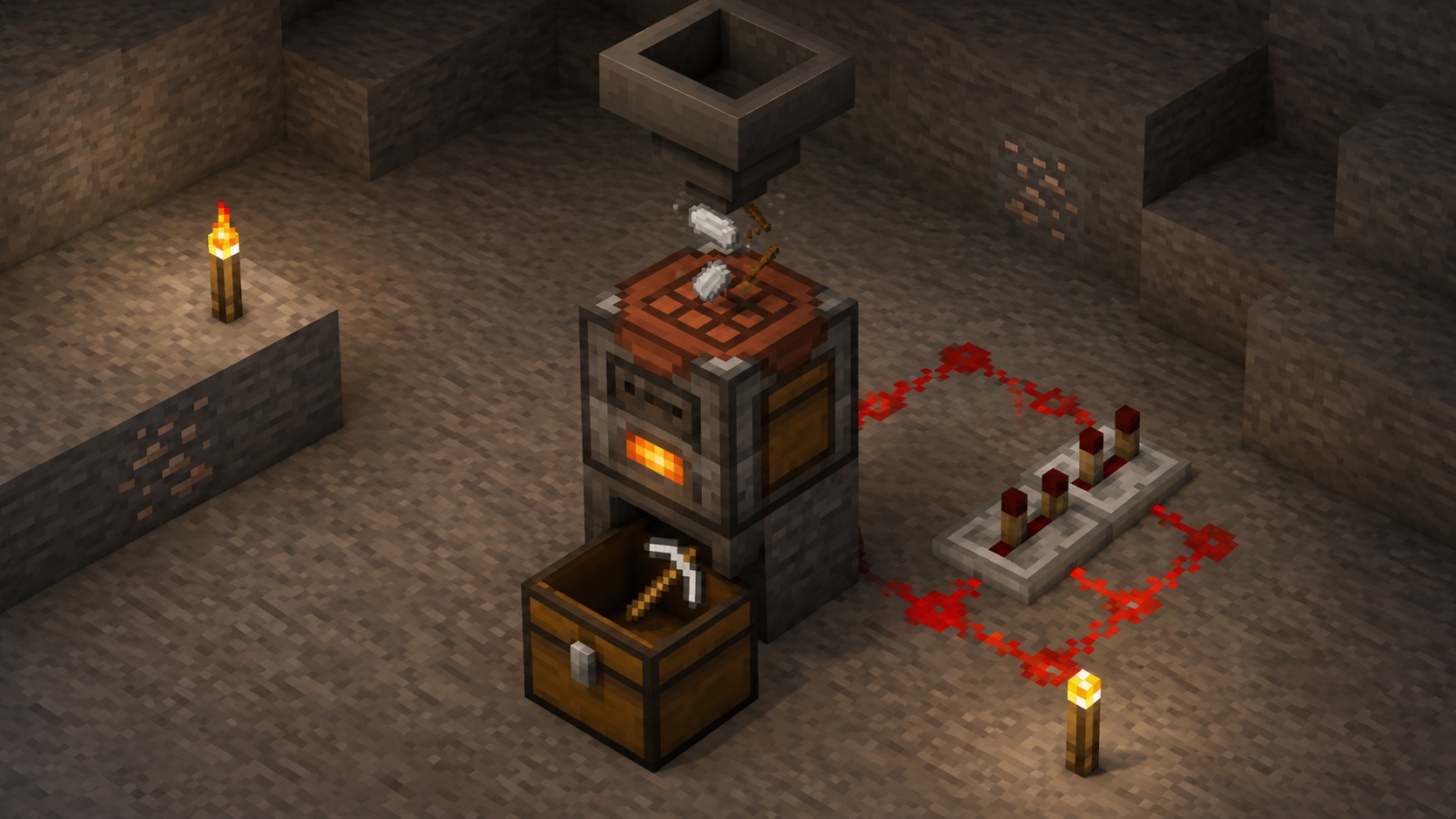
The standard layout is a hopper on top, a Crafter in the middle, and a hopper or chest underneath catching the output. The eye on the Crafter points at the output container.
You feed materials into the top hopper. The hopper drops them into the Crafter, which routes them into the open (non-disabled) slots. A redstone clock or a comparator pulse triggers the Crafter, and it spits crafted items out into the bottom hopper or chest.
For most recipes, the cleanest trigger is a comparator paired with a hopper. When the input hopper has enough items to make a full recipe, the comparator detects the change and pulses the Crafter. That way the machine only runs when there’s something to craft, instead of running on a fixed timer and burning redstone tick cycles for nothing.
Comparator output
A comparator placed against a Crafter reads how full it is. The Crafter outputs a redstone signal based on the number of slots that are either filled or marked disabled. So a Crafter with all nine slots accounted for gives off a strong signal, while a Crafter missing ingredients gives off a weaker one. This is what lets you build a “craft only when ready” circuit that fires only after the input slots line up.
What it can and can’t craft
Anything a normal crafting table can make, the Crafter can make. Tools, weapons, armor, food, redstone parts, building blocks, dye recipes, paper, books, the lot. Shaped recipes need the slots arranged correctly. Shapeless recipes work as long as the ingredients are present in any open slot.
What the Crafter doesn’t do: it can’t run smelting recipes (those need a furnace), brewing (needs a brewing stand), or stonecutting (needs a stonecutter). It also doesn’t do villager trading or anvil work. If the recipe lives on the crafting table, you’re good. If it lives on a different station, the Crafter can’t help.
One nuance worth knowing: the Crafter respects the same recipe rules as a crafting table, including version-specific quirks. If a recipe got changed in a Minecraft update, the Crafter follows the new version automatically.
Practical builds and farm ideas
The Crafter has opened up a lot of farms that used to be tedious or impossible:
- Auto-melon and auto-pumpkin farms that craft seeds back from harvested slices
- Wood-to-planks-to-sticks-to-tools chains that turn raw logs into iron pickaxes
- Bonemeal factories that pull bones from a skeleton farm and craft them straight into bonemeal
- Bulk concrete-powder mixers that combine dye, sand, and gravel
- Map-cloning machines for copying treasure maps
- Auto-bread setups feeding off a wheat farm
The most common pattern is an item filter feeding the Crafter, a comparator pulse triggering it, and a hopper minecart or storage system collecting the output.
Java vs Bedrock differences
Both editions got the Crafter at the same time, and the block, the recipe, the slot-disable feature, and the comparator behavior all match. There are small differences in how some specific recipes ingest items from hoppers because hopper timing on Java and Bedrock isn’t identical, but the Crafter itself is the same on both.
Tips and common mistakes
A few things that trip people up:
- Forgetting to pulse. A constant redstone signal does nothing after the first craft. Use a clock or a comparator-driven pulse so the signal goes on and off.
- Mixing item types in one slot. If a slot needs sticks but a hopper drops in planks first, that slot gets stuck on planks and the recipe never fires. Disable every slot you don’t want filling.
- Wrong eye direction. The eye is the output side. If the Crafter is placed facing a wall, your output shoots into a wall.
- Confusing it with a dropper. The visual is similar, but a dropper just dumps whatever’s inside; the Crafter combines its inventory into a recipe and outputs the result.
- Power source on top. A redstone block on top works for a single craft, but it leaves the signal on. To craft again, you need to remove and replace the block (or use a clock circuit instead, which is almost always easier).
Frequently asked questions
What version added the Crafter?
Java Edition 1.21 and Bedrock 1.21.0, both released in June 2024 as part of the Tricky Trials update.
Can the Crafter make every recipe a crafting table can?
Yes for shaped and shapeless crafting recipes. It can’t smelt, brew, stonecut, or trade.
How do I lock a slot so it stays empty?
Open the Crafter and right-click the slot you want to disable. It turns dark with an X overlay. Right-click again to re-enable it.
Why isn’t my Crafter crafting?
Three common causes: the redstone signal isn’t pulsing (it’s stuck on or stuck off), the recipe ingredients aren’t placed in the right slot pattern, or the output is blocked by a full container in front. Check those three first.
What does the comparator read off a Crafter?
Signal strength based on how many of the nine input slots are either filled or disabled. A fully prepared Crafter gives a strong signal; one missing ingredients gives a weaker one. Use this to fire the craft only when the slots line up.
Does the Crafter need fuel?
No. It runs on redstone alone. The only cost of crafting is the ingredients themselves, just like a regular crafting table.
Can a hopper above a Crafter overfill it?
No. Each slot has a stack limit just like any inventory slot, and the hopper stops pushing items into a full slot. Disabled slots are treated as full for this purpose.
Is the Crafter affected by Silk Touch or Fortune when mined?
No. The Crafter drops itself when broken with any pickaxe, with no enchantment effects on the drop. You do need a pickaxe to break it; mining it by hand or with the wrong tool gives no drop.
Closing thoughts
The Crafter is one of those blocks that quietly changes what’s possible without changing how the game looks. It plugs the last big gap in redstone automation: actually crafting things. If you’ve ever built a wheat farm and wished it spat out bread, this is the block that finishes the job.