What is a chiseled bookshelf?
A chiseled bookshelf is a wooden block that stores up to six books and outputs a redstone signal based on which slot you last touched. It was added in update 1.20 alongside the Trails & Tales features, and it works the same way on Java and Bedrock.
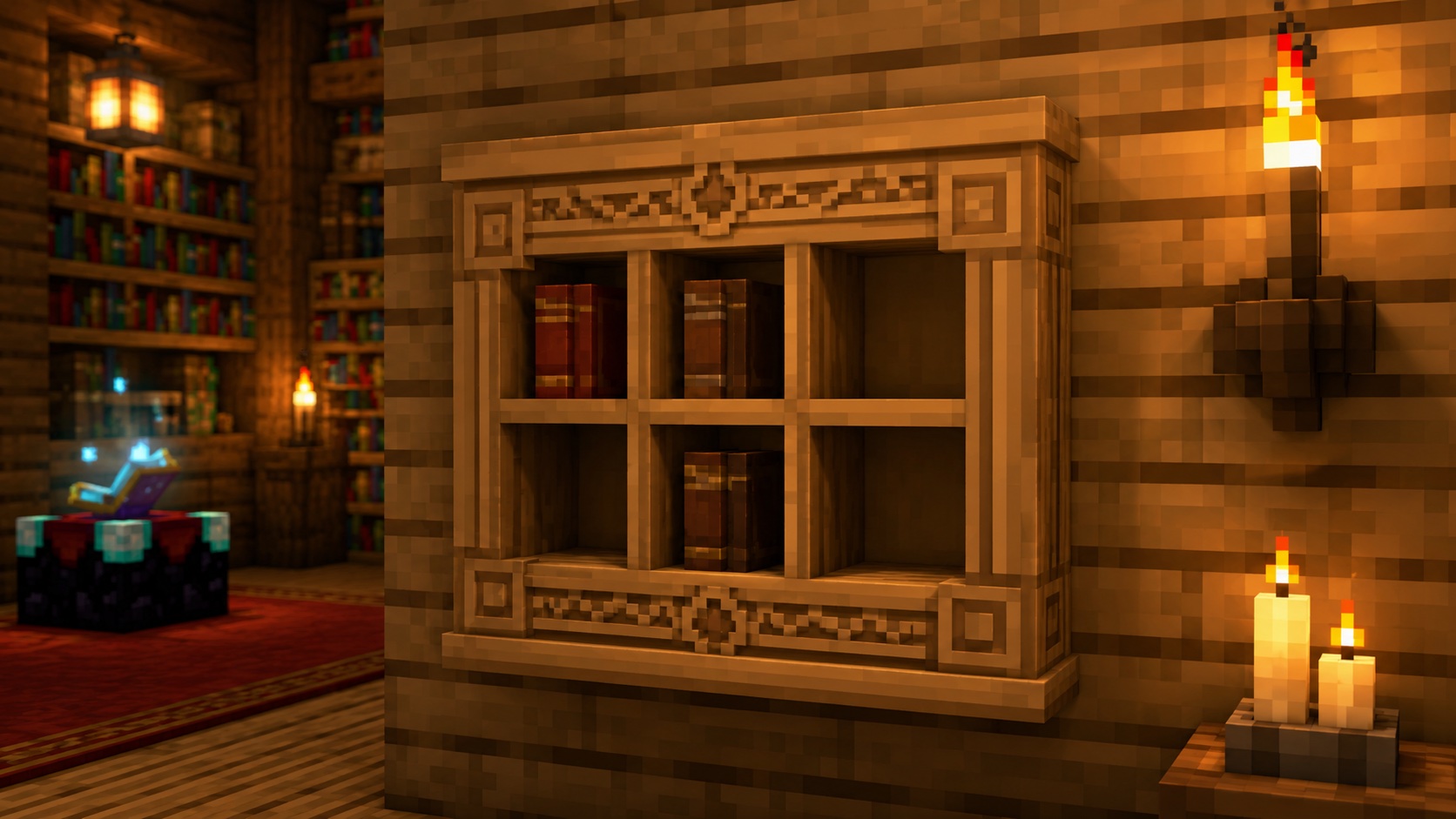
It looks like a regular bookshelf with six visible slots on the front. Each slot holds one book, and you interact with each slot individually. That makes it the first storage block in the game with built-in slot-aware redstone output, which is why most builders use it for hidden doors and toggleable bases instead of for reading.
If you only want decoration, a regular bookshelf still works fine. The chiseled version is for players who want a storage block with redstone behavior baked in.
How to craft a chiseled bookshelf
The recipe is six matching wood planks plus three books, arranged in a sandwich on the crafting table:
- Top row: three planks
- Middle row: three books
- Bottom row: three planks
You can use any single wood type: oak, spruce, birch, jungle, acacia, dark oak, mangrove, cherry, bamboo, crimson, or warped. The block keeps the texture and color of the wood you chose. Mixing wood types in the recipe will not work; all six planks have to match.
Each book costs three paper and one piece of leather, so the full recipe of one chiseled bookshelf adds up to six planks, nine paper, and three leather. Sugar cane and cow farms scale this up quickly, which is why most survival builders craft these in stacks.
Where to find chiseled bookshelves naturally
Chiseled bookshelves generate inside trail ruins, the buried structures introduced with the same update. They show up in the suspicious sand and gravel loot tables as a rare archaeology find, but they are rare enough that crafting is faster than digging. You will not find them in villages, strongholds, or end cities.
What you can store in it
A chiseled bookshelf has six slots, and each slot accepts one of these item types:
- Book
- Book and Quill
- Written Book
- Enchanted Book
It will not accept regular blocks, paper, or anything else. If you try to put a non-book item in, nothing happens and the slot stays empty.
Each slot is independent. You can fill slot 1 with an enchanted book and leave the rest empty, fill slots 1, 3, and 5, or fill all six. Books do not stack inside this block; you cannot put a stack of books into one slot.
How to insert and remove books
Aim at the specific slot on the front of the block. The crosshair tells you which slot is selected. Right-click on Java (or use the place button on Bedrock and console) to insert the book in your hand. Right-click again on a filled slot to take that book back out.
You only interact with the slot you are aimed at. There is no master “open inventory” screen for the chiseled bookshelf, the way there is for a chest or a barrel. Every action targets one slot, and the slot you last touched is the one the redstone signal tracks.
Books returned from the bookshelf keep their data. An enchanted book stays enchanted, a written book keeps its text, and a book and quill keeps any draft pages.
Redstone behavior, explained
The chiseled bookshelf is the reason the block exists in the first place. Place a redstone comparator behind it, and the comparator reads a signal from 0 to 6 based on the last slot you interacted with:
- No interaction yet: signal 0
- Last action involved slot 1: signal 1
- Last action involved slot 2: signal 2
- Last action involved slot 3: signal 3
- Last action involved slot 4: signal 4
- Last action involved slot 5: signal 5
- Last action involved slot 6: signal 6
One important detail: the comparator does not measure how full the bookshelf is. It tracks the most recent slot you touched, even if that slot is now empty. So if you insert a book into slot 4 and then remove it, the comparator still reads 4 until you touch a different slot.
That single design choice is what makes the block useful as a hidden combination lock. You can build a “code” by interacting with slots in a specific order and use the resulting signal levels to drive a piston door, a dispenser, or a sequence of redstone lamps.
Reading the signal with a comparator
A comparator can sit in two modes. In compare mode (one front torch lit) the comparator passes the signal straight through, so a slot-3 read produces a strength-3 line of dust behind it. In subtract mode (both front torches lit) the comparator subtracts a side input from the bookshelf reading, which is useful when you only want a circuit to fire on a specific match.
From there, the signal feeds normal redstone: dust, repeaters, lamps, doors, dispensers, command blocks, anything that responds to a power level. The block accepts comparator input on every horizontal side, so layout is flexible.
Hoppers do not work
You cannot pipe books in or out with hoppers. A hopper aimed at a chiseled bookshelf will not insert. A hopper underneath will not pull. The block is intentionally hand-only for inserting and removing, which keeps the redstone “code” honest. If you want automated book sorting, use barrels and chests with hopper logic, then move books into the bookshelf manually.
Mining, breaking, and recovery
Any tool will break a chiseled bookshelf. An axe is fastest, but a fist works too if you are short on tools. The block always drops itself when broken, the same way a regular bookshelf does. The books inside drop separately as the items they were when you put them in, including enchantments and written content. Nothing inside the block is lost on break.
Silk Touch is not required. Fortune does not produce extra drops. Hardness and blast resistance are both low, so creepers and TNT will destroy a chiseled bookshelf without much trouble. Place sensitive book displays away from doorways and mob spawn lines.
Common uses
Three patterns cover almost every survival use of this block.
The first is a hidden door. Build a wall of chiseled bookshelves in front of a piston door and wire each block to a comparator. The combination is the order you touch slots, or which slots you fill to match a target signal level. Visitors see a normal library wall; only you know the right pattern.
The second is decoration. The block looks great in libraries, enchanting rooms, mage towers, and study builds. Mix it with regular bookshelves for visual variety, since the chiseled version has a more detailed front face and shows whether or not it holds books.
The third is item display. Put a written book with a custom title in a specific slot and label it with a sign next to the bookshelf. This works well for player-run servers, museum builds, and quest lines that hand the player a book with instructions inside.
Does it boost an enchanting table?
No. Only regular bookshelves placed within one block of an enchanting table count toward enchantment level. A chiseled bookshelf next to an enchanting table does nothing for the max enchant level. If you want to hit level 30, use 15 regular bookshelves in the standard ring layout and keep the chiseled ones for redstone or display work.
Tips, tricks, and common mistakes
Watch your wood type when crafting. The recipe locks you into one wood across all six planks, so you cannot mix oak and spruce in one block. If you want a striped library, craft each chiseled bookshelf separately and place them next to each other.
Plan slot order before you wire it. Once redstone is in place, swapping the meaning of slot 1 and slot 6 means rewiring the comparator output. Decide your “code” before laying any dust.
Test the comparator output by walking up and right-clicking a single slot. The signal should jump to the slot number, not stay at zero. If it stays at zero, the comparator is in the wrong place; the comparator’s input arrow has to face away from the bookshelf.
The block is not waterloggable. You cannot put it in a water column without breaking the water flow.
It does not catch fire on its own from lava the same way wood does, but it will burn if hit by an open flame from a campfire or a fire block, so keep candles and torches a block away.
Java vs. Bedrock differences
The block behaves the same on both editions. The recipe, slot count, redstone output, and inventory rules are identical. The only difference is the input: Java uses right-click, Bedrock uses the place button on controller and tap-to-place on touch. There is no version where chiseled bookshelves accept different items or hold more than six books.
Frequently asked questions
Can a hopper put books into a chiseled bookshelf?
No. Hoppers cannot insert into or extract from a chiseled bookshelf. All book movement is by hand. This is by design, so that redstone “codes” cannot be brute-forced by automation.
Does a chiseled bookshelf power an enchanting table?
No. Only regular bookshelves count toward enchantment level. The chiseled version is decorative and redstone-aware, but it does not give an enchanting table any power.
What is the redstone signal when the bookshelf is empty?
Zero. Until you touch a slot, the comparator reads 0. After your first interaction, the signal locks to that slot number until you touch a different slot.
Can I store an enchanted book inside?
Yes. Enchanted books, written books, books and quills, and plain books all work. The enchantment data is preserved. Take the book out and the enchantment is intact.
Will a chiseled bookshelf burn?
It can catch fire from nearby flame sources, the same as other wooden blocks. Lava, fire blocks, and campfires can ignite it. Keep flames at least one block away if you do not want to lose your books.
Can I dye a chiseled bookshelf?
No. The color comes from the wood used in the recipe. To get a different shade, craft another bookshelf with the wood type you want.
How many bookshelves do I need for a hidden door?
One can do it if you only need a single signal level. Most builders use two or three to make the combination harder to guess. The math is up to you, but each block supports up to six unique signals.
Final note
The chiseled bookshelf is the closest thing Minecraft has to a built-in keypad, packaged in a block that also looks decent on a library wall. If you have been running pressure-plate or item-frame combination locks, swap one of these in and rewire. The build will be tighter, and the cover story (a normal-looking library) will be much harder for visitors to break.