What is a horn coral block?
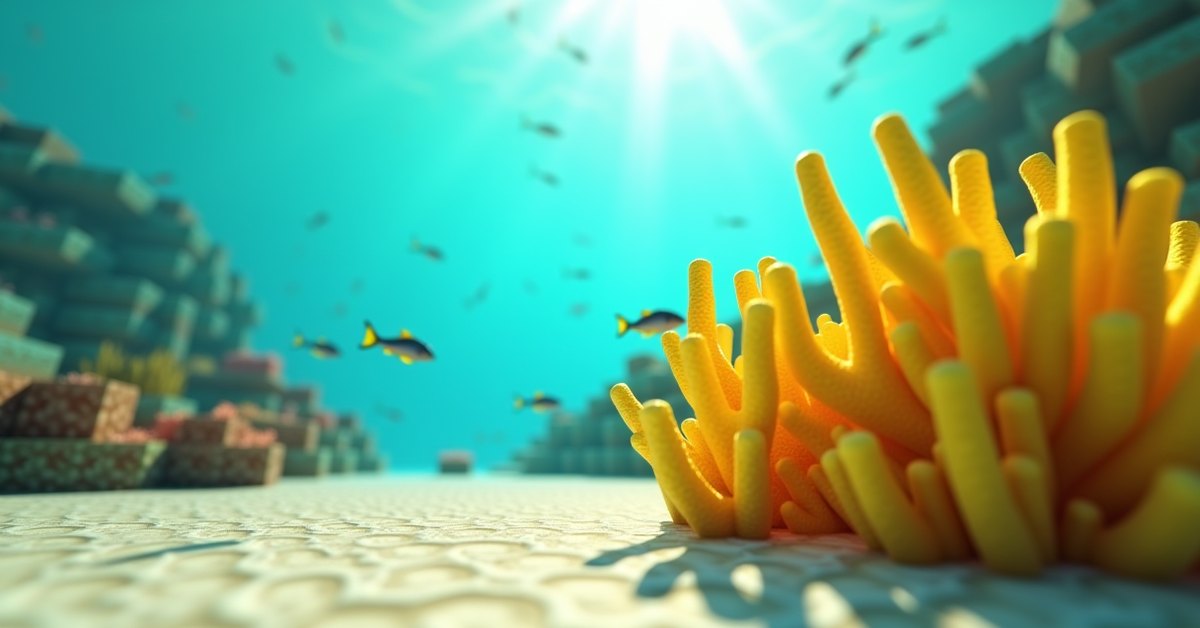
A horn coral block is one of the five coral blocks added to Minecraft in the Update Aquatic. It’s the bright yellow variety, the kind that looks like a clump of fingers reaching up off the seabed. You’ll spot it in warm ocean coral reefs alongside its four cousins: brain, bubble, fire, and tube coral.
Unlike most blocks in the game, a horn coral block isn’t a passive piece of scenery. It’s technically alive. Keep it next to a water source and it stays that bright yellow. Cut it off from water, and within a short timer it dies and turns gray, becoming a dead horn coral block.
That single mechanic, the “must touch water” rule, is the main thing players run into when they try to decorate with coral. The rest of this guide covers where to find horn coral block, how to mine it without killing it, and how to actually keep it alive once you bring it home.
Where to find horn coral block
Horn coral block only generates in warm ocean biomes. You won’t find it in lukewarm oceans, cold oceans, or any other water biome. Look for the bright turquoise water with sand at the bottom and coral structures rising off the sea floor.
Inside a warm ocean, the block shows up in coral reefs as part of the structure’s natural mix. A single reef contains a random spread of all five coral types, so most reefs have at least a few horn coral blocks somewhere in them. The yellow ones tend to stand out against the darker brain and tube colors.
If you can’t find a warm ocean nearby, two faster routes exist:
- Travel by boat along oceans until the water turns turquoise. Warm oceans border lukewarm oceans, so once you see lukewarm water (greenish-blue, with sandy floors and no coral), you’re close.
- Trade with a wandering trader. Wandering traders sometimes sell live coral blocks, including horn, for emeralds. The trade isn’t guaranteed to appear, so this is a slow method.
You can also grow new coral structures by using bonemeal on the warm-ocean floor, which has a chance to produce horn coral block as part of the result. More on that in the next section.
How to mine horn coral block
Horn coral block requires a pickaxe to mine. Any tier works (wooden, stone, iron, diamond, netherite, or gold). Mining it by hand or with the wrong tool gives you no drop at all.
By default, mining a horn coral block with a regular pickaxe drops a dead horn coral block. The live version dies the moment you break it without Silk Touch. That’s almost certainly not what you want.
To get the live, yellow version to drop, use a pickaxe enchanted with Silk Touch. Silk Touch preserves the live block as the dropped item. This is the only way to bring live horn coral block home without using Creative mode.
One important detail: even after you mine it with Silk Touch, the live block in your inventory will die if you place it outside of water. The Silk Touch part only matters for the mining step. Placement is a separate problem, covered below.
Can horn coral block be crafted?
No. There’s no crafting recipe for horn coral block. You can only get it by mining a live or dead one (Silk Touch for the live drop), finding the dead version naturally, trading with a wandering trader, or using Creative mode and commands.
Keeping horn coral block alive
A live horn coral block must have a water source block touching it on at least one side (including above and below). If every adjacent block is air, sand, dirt, or flowing water, it dies after a short timer and converts to dead horn coral block.
“Water source block” is the part that matters. Flowing water doesn’t count. A live coral block surrounded by flowing water with no source nearby will still die. The safest setup is to fully submerge the block in a body of still water with at least one source block adjacent.
Waterlogging works too. If you place a live horn coral block and then right-click an adjacent space with a water bucket so that the surrounding block becomes a water source, the coral stays alive. Many players build a small pond of water source blocks and place the coral directly into it, which guarantees adjacency on multiple sides.
A few common ways players accidentally kill their coral:
- Placing it on land and forgetting to add water immediately. The coral starts its death timer the second it’s placed without water adjacency.
- Building a wall of coral two or three blocks thick. The inner blocks may not all be touching a source block, so the inside coral dies even while the outside survives.
- Using ice or packed ice next to coral. Ice is not water; it doesn’t keep coral alive. The coral dies as if the ice block were any other solid.
- Using a sponge nearby. Sponges absorb water source blocks, removing the coral’s water supply.
If a horn coral block has already died, you cannot bring it back. Dead horn coral block is a separate item with its own appearance and no mechanic for revival.
Growing new horn coral block with bonemeal
In warm oceans, you can grow new coral structures by using bonemeal on a sand block or other valid surface in the water. The result is a randomized coral structure, similar in shape to natural reef formations, made up of all five coral types in random arrangement.
That means bonemeal isn’t a way to target horn coral specifically. The structure that grows will usually contain some horn coral block, but the exact count and placement is random each time. If you need a specific amount, bonemeal repeatedly and mine what you need with Silk Touch.
A few rules for the bonemeal trick:
- You must be in a warm ocean biome. Bonemealing the seafloor in a different biome does nothing.
- The block being bonemealed needs to be a valid surface. Sand and dirt-like blocks work best.
- The space above must be water for the structure to grow into.
Uses for horn coral block
Horn coral block is primarily decorative. It has no crafting or smelting use beyond aesthetics. Common builds and uses include:
- Underwater bases and reef recreations. A live coral wall behind a glass viewing port is one of the most popular ways to use the live block.
- Aquarium-style display tanks. Combine horn coral block with sea pickles for ambient light, and the yellow reads as a warm accent against blue water.
- Tropical builds where the coral signals warm climate. Even out of water (as dead horn coral block) it works for stone-textured natural builds, since dead coral takes on a gray, stone-like appearance.
- Color-coded sorting or visual landmarks. The yellow is distinct enough to stand out at a distance.
Horn coral block also produces a small particle effect when active, similar to other live coral. The particles are subtle and only show up close to the block.
Java and Bedrock differences
The behavior of horn coral block is essentially identical across Java Edition and Bedrock Edition. Both versions:
- Require Silk Touch to drop the live block.
- Die when not adjacent to a water source block.
- Generate in warm ocean coral reefs.
- Can be grown using bonemeal on the warm-ocean floor.
The only minor difference is in particle behavior and visual rendering, which doesn’t affect gameplay. If a video or guide says one thing about horn coral block on Java, it almost certainly holds true on Bedrock as well.
Frequently asked questions
What pickaxe do I need to mine horn coral block?
Any pickaxe works, from wooden to netherite. The tier doesn’t matter for coral blocks; the requirement is just that you use a pickaxe at all. Without one, the block breaks but drops nothing.
Why does my horn coral block keep turning gray?
It’s dying. A live horn coral block must touch a water source block on at least one side. If it’s only in flowing water, or fully out of water, it dies and becomes dead horn coral block. Add a source block adjacent to it and the next coral you place will stay alive.
Can horn coral block grow naturally over time?
No. Coral blocks don’t spread or grow on their own. The only way to create new horn coral block in survival is to use bonemeal on a valid surface in a warm ocean and hope the random structure includes some.
Does horn coral block need to be in a warm ocean to stay alive?
No. Once you mine it with Silk Touch and place it elsewhere, the biome doesn’t matter. The only requirement is water source adjacency. You can keep a horn coral block alive in a desert biome aquarium as long as the water around it stays in place.
Can I waterlog horn coral block?
Yes. Place the block, then right-click an adjacent space with a water bucket to make that space a water source. The coral stays alive as long as the adjacent water source remains.
Will sponges kill my coral?
Yes, indirectly. Sponges absorb water source blocks. If a sponge removes the source block next to your coral, the coral starts dying immediately. Keep sponges far away from any coral display.
Does horn coral block work in lava?
No. Lava destroys coral blocks the same way it destroys most non-stone blocks. Even if it didn’t burn them, the lack of water adjacency would kill the coral within seconds.
Final thought
Horn coral block looks great in a thoughtful build, but it’s the kind of block that punishes inattention. The yellow only survives where the water keeps a source block next to it. If you treat it like any other decorative block, you’ll end up with a wall of gray and a lesson learned. Plan the water around the coral, not the other way around.