What a map does in Minecraft
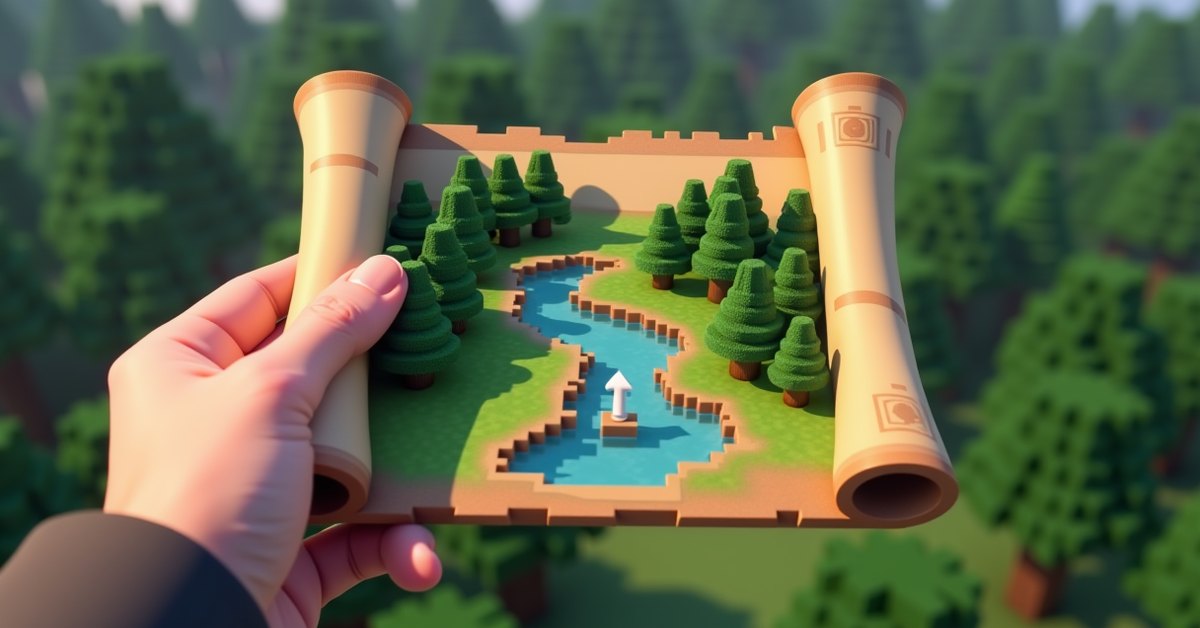
A map in Minecraft is an item that draws a top-down picture of the land you walk across. When you hold a fresh map and use it, the game starts filling in the terrain around you, so you end up with a small painted chart of your world that you can carry, hang on a wall, or hand to a friend.
Maps are most useful for two things: finding your way back to a base, and keeping track of a big build or a large area you are exploring. A single map only covers a set patch of ground, but you can zoom it out to cover much more, copy it so everyone on a server sees the same chart, and pin markers on the spots that matter.
This guide covers how to craft a map, how filling and zooming work, how to copy and lock maps, and how to mark locations with banners. It also clears up the parts that trip people up, like why a map made at spawn never seems to show your house.
How to craft a map
You make a map from paper and a compass. Paper comes from sugar cane: three sugar cane in a row on a crafting grid gives you three paper. A compass needs four iron ingots placed in a plus shape around one piece of redstone dust.
Put one compass in the center of the crafting grid and surround it with eight paper. That gives you an empty map in Java Edition, sometimes called an empty locator map because it tracks your position. In Bedrock Edition you have a choice: nine paper with no compass makes a plain empty map with no position marker, while eight paper plus a compass makes an empty locator map that shows where you are.
The compass is what adds the white player pointer to the map. If you only want a static chart and do not care about seeing your own location, the paper-only Bedrock version saves you the iron.
Filling in the map
An empty map is blank until you use it. Hold it and press the use button (right-click on a computer), and the map snaps to a fixed center based on where you are standing. From that moment the map will only ever show that one square of the world. Walk around inside its borders while holding it, and the terrain paints itself in. Step outside the borders and the edge stays gray until you make or zoom a map that reaches there.
This is the single most common point of confusion. The map centers on your position the first time you use it, not on spawn and not on your base. If you craft a map at your house, use it there so your house sits near the middle.
How maps work
Every map has a scale, and a fresh one starts at the smallest scale, called zoom level 0. At that level the map covers a 128 by 128 block area, which is one pixel per block. That sounds large, but it fills up fast once you start traveling.
Maps update in real time while you hold them and stay inside their area. The land you have already seen stays drawn even when you put the map away. Other players and certain markers move live on the map as long as someone is holding a copy that covers them.
A locator map shows a white arrow for your position and the direction you face. When you are outside the map’s borders, that arrow shrinks into a small dot pressed against the nearest edge, pointing you back toward the charted area. A plain Bedrock map with no compass skips the arrow entirely.
Zooming out at a cartography table
To cover more ground, you zoom the map out. The easiest way is a cartography table, which you craft from two paper on top of two planks. Place your filled map in the table and add one paper, and the scale jumps up a level. Each level quadruples the area:
| Zoom level | Blocks covered | Blocks per pixel |
|---|---|---|
| 0 | 128 x 128 | 1 |
| 1 | 256 x 256 | 2 |
| 2 | 512 x 512 | 4 |
| 3 | 1024 x 1024 | 8 |
| 4 | 2048 x 2048 | 16 |
Level 4 is the maximum. A fully zoomed map covers a huge 2048 by 2048 block region, though each pixel now stands for a 16 by 16 patch, so fine detail blurs together. You can also zoom in the crafting grid by surrounding a map with eight paper, which bumps it up one level per craft.
Zooming keeps the same center point, so a zoomed-out map of your base still has your base near the middle. You will need to walk the new, larger borders to fill in the freshly added land.
Copying and locking maps
You can clone a map so two people carry the same live chart. Place a filled map and an empty map of the same size together, either in a crafting grid or a cartography table. Both come out as linked copies, and every copy updates as any holder explores. This is how a whole server can share one growing map of spawn.
Sometimes you want a snapshot that never changes, like a record of a build before you tear part of it down. In a cartography table, combine a map with a glass pane to lock it. A locked map stops updating, even when terrain underneath it changes, and any copies you make from it stay locked too.
Marking locations with banners and item frames
Banner markers
Placing a banner in the world lets you label a spot on your map. Stand next to a placed banner, hold the map, and use it on the banner. A small marker appears on the map at that exact location, colored to match the banner. If you named the banner in an anvil first, the name shows on the map too. This is a clean way to label a village, a mine entrance, or a friend’s house without guessing at coordinates.
Break the banner in the world and its marker disappears from the map the next time the map updates.
Map walls with item frames
A map placed in an item frame shows its full picture on the wall instead of a tiny held version. Line up nine zoomed maps in a 3 by 3 grid of item frames, with each map centered on the neighboring region, and you get one giant continuous wall map of your world. A map inside an item frame also adds a green marker on any matching map you hold, which helps you find your own map wall from far away.
Explorer maps from cartographers
Not every map is one you draw yourself. Cartographer villagers sell explorer maps that point to specific generated structures. The ocean explorer map leads to the nearest ocean monument, the woodland explorer map leads to a woodland mansion, and newer versions added a trial chamber explorer map. These maps show a colored marker on the target structure, so they are a reliable way to find places that are otherwise hard to stumble onto.
Treat explorer maps as a starting direction rather than a precise pin. The marker shows the structure’s general location, and you still have to travel there and explore on the ground.
Maps in the Nether and the End
Maps are tied to the dimension where you first use them. A map filled in the Overworld will not draw anything useful if you carry it into the Nether. In the Nether, maps show a red and gray haze instead of terrain, because the dimension has a solid ceiling and the map cannot read a clean top-down view. You can still see player and banner markers on a Nether map, which is the main reason people make one there.
In the End, maps work much like they do in the Overworld and chart the islands normally. If you plan to map the End, craft and first use the map after you arrive.
Tips and common mistakes
Use a new map at the spot you care about, not wherever you happened to craft it, so that place lands near the center. Zoom a map to level 2 or 3 before you do serious exploring, since a level 0 map fills up almost immediately. Keep a copy of your main base map in an item frame at home so you always have a reference, and carry a separate copy while you travel.
If your map looks frozen, check whether it is locked or whether you have wandered outside its borders. A locked map will never change, and a map only paints the area inside its fixed edges. Holding the wrong copy, or one centered on a different region, is another easy mistake on servers where several maps look alike.
Java vs Bedrock differences
The biggest difference is the empty map recipe. Java always uses a compass, so every crafted map tracks your position. Bedrock lets you skip the compass for a plain map with no arrow, or add one for a locator map. Beyond that, the scale levels, cloning, locking, and banner markers behave the same way across both editions, with only minor interface differences at the cartography table.
Frequently asked questions
Why doesn’t my map show my house?
A map centers on wherever you first used it and only covers a fixed area from there. If your house sits outside that square, it will never appear. Make or zoom a map while standing at the house so it falls inside the borders.
Do maps update automatically?
Yes, as long as you are holding the map and standing inside its area, the terrain updates live. Markers for players and banners also move in real time. A locked map is the exception and stays fixed.
How do I make a bigger map?
Zoom it out at a cartography table by adding paper, or surround it with eight paper in a crafting grid. Each step quadruples the area, up to a maximum of 2048 by 2048 blocks at level 4.
Can two players share one map?
Yes. Clone the map by combining a filled map with an empty map of the same size. Every copy stays linked and updates as any holder explores, so a team can share one chart.
Do maps work in the Nether?
Not for terrain. A Nether map shows a red and gray haze instead of a normal view, though player and banner markers still appear, which is why some people keep one for navigation.
How do I stop a map from updating?
Lock it. Combine the map with a glass pane in a cartography table, and it will keep its current picture no matter how the world changes. Copies made from a locked map stay locked.
For most worlds, the smart move is one zoomed-out base map kept in an item frame at home, plus a cloned copy in your pack for the road. Mark the places you keep losing with banners, and you will spend a lot less time wondering which way home is.