What tube coral is
Tube coral is the deep blue member of Minecraft’s five-coral family, added in the Update Aquatic. The other four are brain coral (pink), bubble coral (purple), fire coral (red), and horn coral (yellow). All five behave the same way; only the color changes.
“Tube coral” actually covers six blocks. There are three living forms: the coral itself (a small upright plant), the coral block (a full cube), and the coral fan (a flat piece that sits on a floor or a wall). Each of those has a dead, gray version. So the full set is tube coral, tube coral block, tube coral fan, dead tube coral, dead tube coral block, and dead tube coral fan.
One mechanic ties the set together. Live tube coral needs water touching it. Out of water it turns gray within a few seconds, and gray is permanent. Most of this guide is about working with that rule.
Where tube coral generates
Tube coral only generates in warm ocean biomes, as part of coral reefs. Lukewarm oceans have seagrass and tropical fish but no living coral, and cold, frozen, and deep ocean variants have none at all. Rivers and lakes never have it.
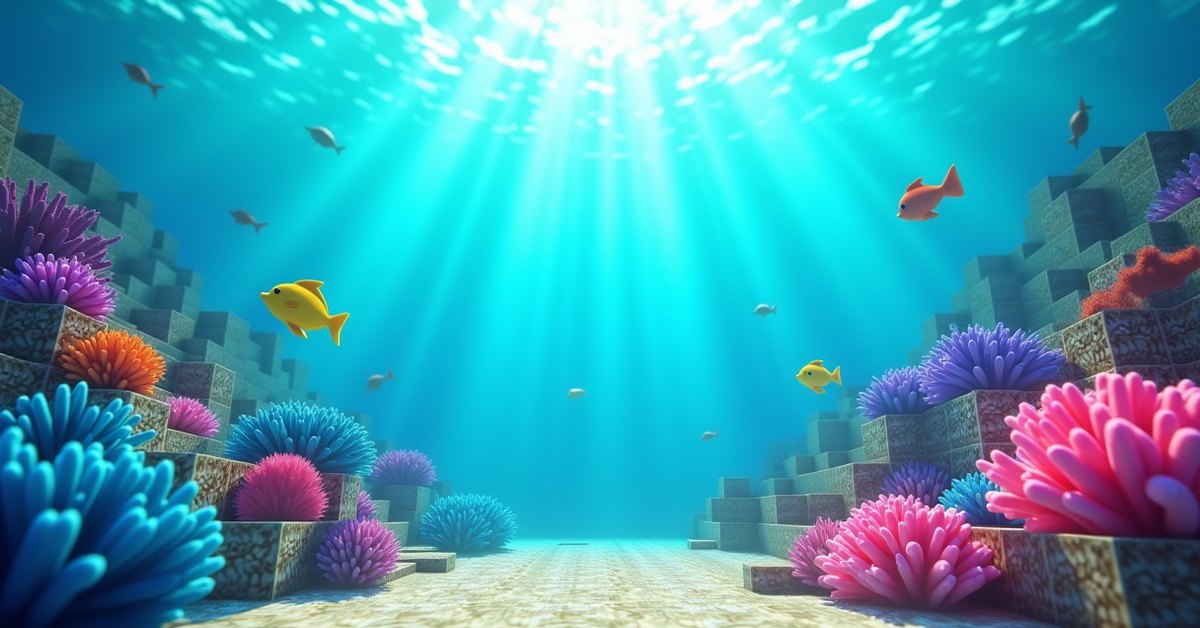
Warm ocean is easy to pick out from the surface. The water is a bright turquoise, the floor is sand instead of dirt or gravel, and reefs sit in low clumps on the seabed. Each clump mixes all five coral colors, with fans and upright sprigs growing on the solid blocks, plus sea pickles and tropical fish. Tube coral is the blue part. Reefs are dense, so one dive can turn up dozens of coral blocks.
If your spawn has no warm ocean in sight, scout by boat. Warm oceans tend to border deserts, badlands, savannas, and jungle coasts rather than snowy or taiga shores. Pufferfish and tropical fish are a good sign too, since they spawn in lukewarm and warm water. The warm ocean biome guide covers the biome in more detail.
Reefs also generate with some dead coral mixed in, usually where the reef pokes above the water line or sits in very shallow water.
The one way to get tube coral without traveling is the wandering trader, who occasionally sells coral blocks for emeralds. Slow, but it works.
The three living forms
Three blocks share the same blue color and the word “tube.” Here is how they differ.
Tube coral (the plant)
Block ID minecraft:tube_coral. This is the small upright sprig: several thin blue stalks growing out of a block, a bit like seagrass or a cluster of organ pipes. It has zero hardness, so any tool (or your fist) breaks it instantly. It has no collision box, lets light through, and gives off no light of its own. It has to sit on a block with a solid top face, and if that block is broken the coral pops off.
Tube coral block
Block ID minecraft:tube_coral_block. This is the full solid cube that reefs are built from, and the base that plants and fans grow on. It behaves like a normal solid block in most ways: mobs path across it, pistons push and pull it, it doesn’t burn, and gravity doesn’t affect it. Hardness is 1.5 and blast resistance is 6, the same as the dead version. It needs a pickaxe to drop anything; hands, swords, axes, and shovels give nothing. Any pickaxe tier works, wood included. Tier only changes how fast you mine.
Tube coral fan
Block ID minecraft:tube_coral_fan when it sits on top of a block, and minecraft:tube_coral_wall_fan when it’s attached to the side of one. The fan is the flat, splayed piece that gives reefs their branching look. It has zero hardness like the plant, no collision, no light, and it attaches to whichever face you click when placing it. A fan stuck to a wall breaks if you mine the block behind it, and a fan on a floor pops off if you break the block underneath. If you’re harvesting both, take the fan first and the block second.
The three dead forms and how coral dies
Each living form has a dead counterpart: minecraft:dead_tube_coral, minecraft:dead_tube_coral_block, and minecraft:dead_tube_coral_fan (plus dead_tube_coral_wall_fan for the side-mounted version). They keep the same shape, hitbox, and hardness as the live version. The blue drains out and the texture flattens into a chalky, bone-like gray. All five coral types turn the same gray when they die, so once a build is dead you can’t tell tube from brain or horn by looking.
Coral dies when it loses contact with water. The check is simple. A live coral block needs water touching at least one of its six faces. A live coral plant or fan needs to be waterlogged itself or have water touching it on any face. Both source blocks and flowing water count, and a waterlogged neighbor (a stair, slab, fence, wall, or trapdoor with water in it) counts as well. A water bucket in your inventory does not; the block next to the coral has to actually be wet.
When no water is touching it, the coral starts a short timer and turns gray within a few seconds. The change is permanent. Adding water back does nothing, bone meal does nothing, and there is no command-free way to revive it. The only fix is to mine the dead piece and place a fresh live one.
Coral in your inventory is safe. The timer only runs while the coral is placed in the world.
Dead coral has none of these problems. It doesn’t need water, doesn’t grow, doesn’t spread, doesn’t react to bone meal, and never changes again. That’s why it’s useful.
How to collect each form
How you mine tube coral decides what you walk away with, and the rules are different for the block than for the plant and fan. Silk Touch is the enchantment that matters.
Live tube coral and tube coral fan
Without Silk Touch, breaking a live coral plant or fan drops nothing. You don’t get a dead version; the block just disappears. This is true with a fist, a sword, shears, or any pickaxe. With Silk Touch on any tool (pickaxe, axe, shovel, hoe, or sword), you get the live item and can replant it. A Silk Touch pickaxe is the standard choice because you’ll usually want the coral block underneath too.
Tube coral block
The block is the one form that gives you something either way. Mine it with any pickaxe and no Silk Touch, and it drops a dead tube coral block. Mine it with a Silk Touch pickaxe, and it drops the live block. Any tier of pickaxe works for both.
That makes the live block the fastest source of dead blocks. If you only want gray cubes, leave Silk Touch at home.
Dead tube coral, block, and fan
The dead block is the easy one: any pickaxe drops it, no enchantment needed. The dead plant and dead fan follow the same rule as their live versions, which surprises people. They need Silk Touch to drop. Break a dead tube coral fan with a plain pickaxe and it vanishes just like a live one would.
The practical route to a stack of dead plants or fans is to collect live ones with Silk Touch, place them somewhere dry, wait for them to turn gray, then mine them again with the same tool. Already-dead pieces in the reef work too.
No coral gives experience when mined, and none of the six blocks has a crafting recipe. You can’t craft a block from fans, a fan from a block, or smelt anything.
Gearing up for a reef trip
Reefs sit near the surface, but you’ll be underwater for a while, so a Water Breathing potion or a turtle shell with Respiration helps. Drowned wander through warm oceans, so carry a weapon. If you don’t have Silk Touch yet, set up an enchanting table before the trip. Mark the reef with a torch or banner above the water so you can find it again when you need one more color.
Placement and waterlogging
The coral block places like any other cube. The plant goes on top of any block with a solid top face, including glass. The fan goes on top of or on the side of any full block, and it orients itself to the face you click. Neither the plant nor the fan stays on non-solid surfaces such as leaves.
The plant and fan are both waterloggable. Place one directly into a water source and it holds water inside its own block space, which is all a live piece needs to stay alive. You can also right-click a placed fan or plant with a water bucket to waterlog it after the fact. Dead plants and fans waterlog too; they stay gray, but water flows through them normally, which is handy in underwater builds where you don’t want stray air pockets. Break a waterlogged piece and the water stays behind.
For a “dry” look with live coral, hide the water. Put a live plant on top of a block, then place a waterlogged slab, stair, or trapdoor beside it. The coral counts that neighbor as water and stays blue while the room reads as dry from most angles. A common mistake is pouring water near coral and then sealing it behind sand or glass without leaving a wet block actually touching the coral. The check is adjacency, not distance.
Watch the color when you place live coral. If it doesn’t stay blue, count the six neighbors: a sign, torch, or button on one side can block the water you thought was there.
Pistons are the other hazard. A piston can push and pull coral blocks (live or dead) like any solid block, but plants and fans break the moment a piston touches them, and a piston can’t carry Silk Touch, so you get nothing back.
Uses and building ideas
Tube coral’s saturated blue is hard to fake with any other block. It reads cleanly against sand, gravel, and prismarine, and it holds its color in low light, where pink brain coral and purple bubble coral wash out.
Aquariums are the classic use. Fill a glass tank with water sources first, lay a sand floor, set tube coral blocks, then plant coral and fans on top and stick fans to the inside of the back glass. Add tropical fish from a bucket and a few sea pickles for light, since coral itself emits none. Sea pickles can be placed on live coral blocks, and bone meal on a sea pickle sitting on a live coral block underwater grows it toward four and spreads more nearby, which is the quickest way to multiply pickles.
Reef dioramas work best with all five colors on a sand or magma base. Mix blocks, plants, and fans so the shapes vary, and drop in a few dead pieces to suggest a reef that’s dying back. Underwater bases and monument builds get a tropical contrast from tube coral against prismarine and sea lantern walls, and fans lining a corridor give a marine-lab feel.
The dead forms open up dry builds. Dead tube coral blocks have a crusty, chiseled texture that breaks up flat stone walls, edges paths next to deepslate, and fits ruins and sunken-ship builds. Dead fans look like bone once the color is gone, so builders use them for ribcages, antlers, giant skeleton spines, and alchemist huts alongside cobwebs and big dripleaf. The upright dead plant fits fossil gardens and desert or beach displays where live coral would die on the spot.
Coral blocks aren’t job-site blocks, so villagers ignore them. No coral sends a redstone signal, outputs to a comparator, or triggers anything. Every one of the six is decorative.
Java vs. Bedrock differences
The main rules match on both editions: warm ocean generation, the Silk Touch requirements, the coral block dropping its dead version without Silk Touch, the fast death out of water, and the permanent dead state. A tutorial that claims a different drop or pickaxe tier on one edition is out of date.
Bone meal is the real difference. In Java Edition, bone meal does nothing to coral of any kind, so the only way to get more tube coral is to find more reef. In Bedrock Edition, bone meal used on live coral or a coral fan that is underwater in a warm ocean can grow a new coral structure of the same type, which is a workable coral farm. On both editions, bone meal has no effect on dead coral.
Tips and common mistakes
Bring the right tool for the piece you want. A plain pickaxe turns live blocks gray and deletes plants and fans outright. Silk Touch keeps everything.
Decide before placing whether a piece should be alive or dead. If the build is dry, use dead coral and skip the water management; from a few blocks away the shape is identical.
To move a lot of live coral, dig a small flooded hole near the reef and place your finds in it as you go. Placed coral doesn’t despawn, so a wet holding pen works as storage until you carry batches home.
Don’t drain an area to get a better look at your coral. Once the water is gone, the timer starts.
Frequently asked questions
Does tube coral need sunlight?
No. It only needs water. A fully enclosed underground aquarium with no sky access keeps coral alive indefinitely.
Why is my tube coral gray, and can I bring it back?
It died from losing contact with water, and no, water and bone meal won’t revive it. Mine the dead piece and replace it with a live one placed in water.
What tool do I need for a dead tube coral block?
Any pickaxe, even wood. Silk Touch isn’t needed for the dead block. The dead plant and dead fan are different: they still need Silk Touch to drop.
Does tube coral stack?
Yes. All six tube coral items stack to 64. They’re also in the Creative inventory under natural blocks, and you can use /give with the IDs above.
Can tube coral fan be placed on glass?
Yes. Fans attach to the top or side of any full block, including glass. That’s what makes aquarium builds work: the fans sit on the inside of the back panel and the tank’s water keeps them alive.
Do coral blocks burn?
No. None of the coral blocks are flammable. Lava destroys them on contact like most blocks, but fire won’t spread to or from them.
Grab the full set
If you’ve already enchanted a Silk Touch pickaxe and found a warm ocean, take all five coral colors while you’re there, and mine a few extra blocks without Silk Touch for gray accents on the way out. Once the coral is home, the only real question is where you put the water.