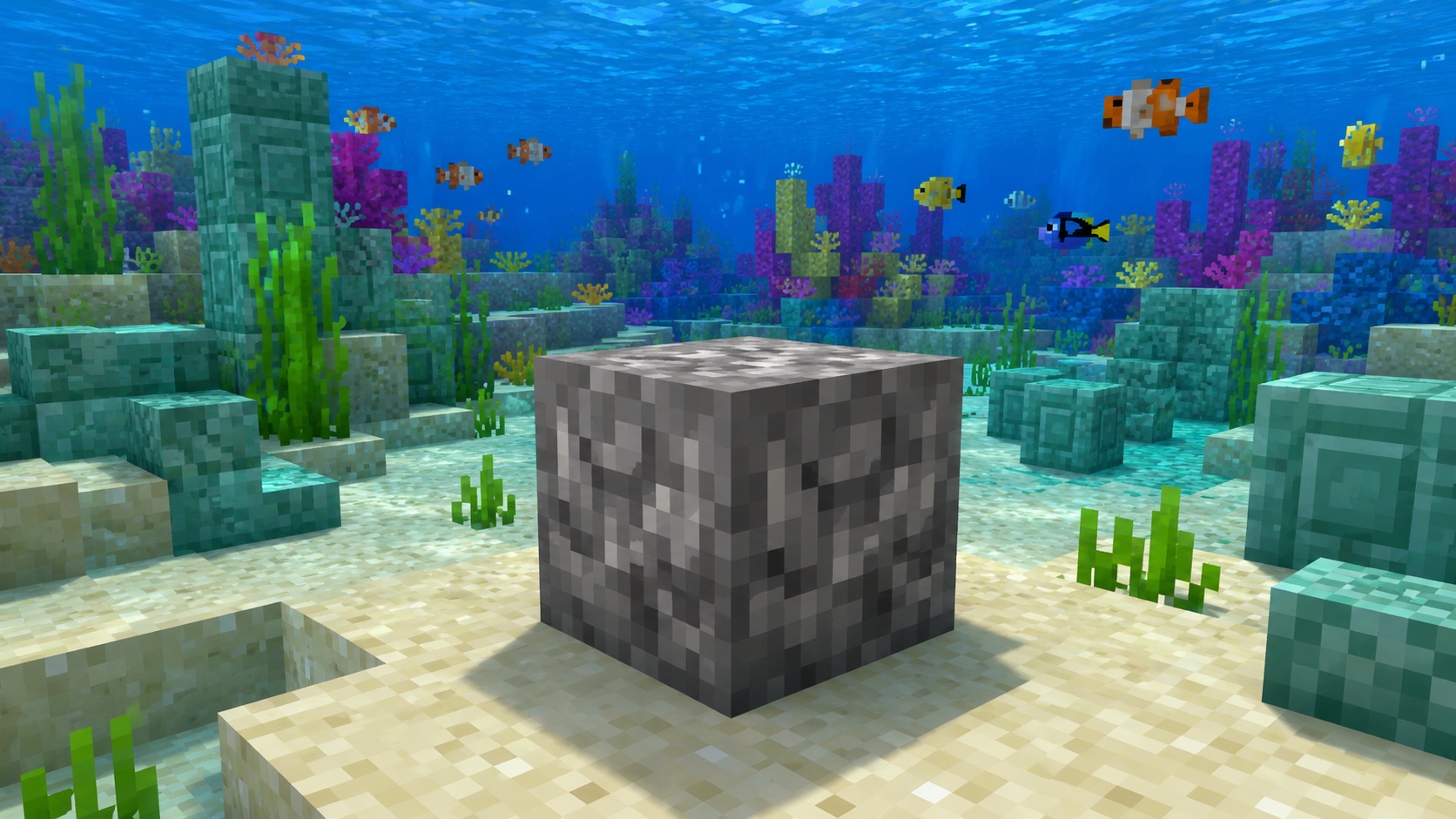
What a dead horn coral block is
A dead horn coral block is the gray, lifeless version of a horn coral block. Live horn coral blocks are mustard yellow and grow inside warm ocean coral reefs. When a horn coral block isn’t touching water on at least one side, it dies and turns into this grayed-out version after roughly half a minute.
Once a coral block is dead, it stays dead. There’s no way to bring it back to life in vanilla Minecraft. The block keeps its shape and texture, but the color is gone, and it no longer behaves like a living block. That makes it useful for builds where you want a clean gray stone look without using actual stone.
How to get a dead horn coral block
You have three reliable ways to get one.
Mine a live horn coral block until it dies
The most common method: find a warm ocean coral reef, locate the yellow horn coral, and mine the live block. If you use a regular pickaxe, the block drops as the dead version automatically. If you use a Silk Touch pickaxe, you get the live version instead, which you can then place out of water and let die naturally.
Find one already dead in the world
Coral reefs sometimes spawn next to a shoreline or up against gravel and dirt. Any coral block that ends up not touching water dies on its own. You can find dead coral blocks scattered around natural reefs without doing anything yourself.
Mine an already-dead block
If a coral block has already died in the world, just mine it with any pickaxe. It drops itself, no Silk Touch required. Your hand or a non-pickaxe tool gets you nothing, so always carry a pickaxe when you’re poking around a reef.
Mining requirements and drops
You need a pickaxe of any tier. Wooden works fine. Mining without a pickaxe destroys the block and gives you no drop, so don’t try to punch it.
Silk Touch isn’t required for the dead version. The block drops itself. Silk Touch only matters when you’re trying to keep a live coral block alive for transport.
Fortune doesn’t increase drops on coral blocks of any kind, dead or alive. Each block gives exactly one item every time.
Hardness-wise, a dead horn coral block sits between dirt and stone. A wooden pickaxe takes a couple of seconds to break it; an iron pickaxe handles it in well under a second. Beacon haste effects speed it up further if you’re collecting in bulk for a build.
You can’t craft dead horn coral blocks at a crafting table or a stonecutter. Letting a live block die or finding one already dead in the world are the only sources. There’s no recipe to make new ones, and you can’t dye a different block to fake the look.
Where dead horn coral blocks generate
Dead horn coral blocks generate naturally in two situations:
- Inside warm ocean coral reefs, when the live block ends up touching air, sand, or another non-water block. It dies during world generation or shortly after.
- In coral reef ruins exposed by beach generation, world edges, or terrain features that cut through a reef.
You won’t find them in cold, frozen, or lukewarm oceans. Coral only generates in warm ocean biomes, so dead coral blocks only show up where coral grew first.
How to use dead horn coral blocks in builds
The block has the same shape and behavior as cobblestone or stone: full cube, opaque, solid. Mobs spawn on it, you can place torches and signs on it, and it conducts redstone signals exactly like any other normal block. Pistons push and pull it without trouble.
The reason builders reach for it is the texture. It’s a soft, slightly fuzzy gray pattern that doesn’t quite match any stone variant. Combined with other dead coral block colors (brain, bubble, fire, and tube, all gray when dead but with different surface detail), you can build entire structures that feel weathered or coral-themed without using paint, dye, or anything that requires processing.
Some common uses for the block:
- Decorative gray walls in coastal builds where pure stone would feel too sharp.
- Underwater ruins, since the block stacks well with prismarine and sea lanterns.
- Roof texturing, especially mixed with cobbled deepslate or andesite for variation.
- Flooring inside builds with a salvaged or shipwreck theme.
- Outer shells of weathered statues and pillars where you want soft texture rather than crisp stone.
Dead coral block vs. dead coral fan
It’s easy to confuse the two if you’re new. Here’s the difference in plain terms:
- The block is a full cube. You place it like cobblestone, and it acts like a normal solid block.
- The fan is a flat decorative piece. It has to attach to a block face (top, side, or bottom) and is roughly the size of a thin tile.
Both come in dead versions, both come from the same coral type, and both can be mined with any pickaxe. But they’re separate items in your inventory and behave very differently when placed.
Java vs. Bedrock differences
The mining and drop behavior is the same on Java and Bedrock. A pickaxe gets you the block; no pickaxe gets you nothing. Silk Touch isn’t needed for the dead version on either edition.
One small difference shows up in how natural reef generation handles dying blocks. Bedrock tends to leave more scattered dead coral around the edges of warm ocean reefs because of how the biome generator places coral up against existing terrain. Java reefs feel slightly cleaner and more alive by comparison. The blocks themselves work the same once mined and placed.
Tips and common mistakes
The mistake players make most often: trying to take horn coral home by sticking it in a bucket of water. That works for the live block in transit, but the moment you place it on land without water on every needed side, it dies. If you actually want the live yellow version in your build, plan for water access first, then place the coral.
If you only want the gray dead version, skip the Silk Touch pickaxe. Mining the live block with a regular pickaxe gets you the dead version directly, which saves the trip back home with a fragile water pocket.
Don’t try to relight a dead coral block with bone meal. Bone meal grows things that are alive, like saplings, kelp, and sea pickles, but a dead coral block isn’t biologically active anymore. There’s no in-game way to revive it.
If you’re farming dead coral blocks for a build, bring shears too. Shears are needed for harvesting coral fans, and you’ll often want both blocks and fans for a coral-themed build.
Watch out for drowned and guardians while you’re mining around a warm ocean reef. The fish are friendly, but a guardian patrol from a nearby ocean monument can ruin a coral run quickly. Build a small fence of solid blocks behind you if you plan to stay underwater for a while.
Frequently asked questions
Can I keep a horn coral block alive on land?
Only if it stays adjacent to water on at least one side. A water source block next to it works, and so does a waterlogged neighboring block such as a slab or stairs. Cut off the water and it dies in about 30 seconds.
What pickaxe do I need for a dead horn coral block?
Any pickaxe works. Wooden, stone, iron, gold, diamond, or netherite all drop the block successfully. Don’t use your hand or a different tool, since the block will break with no drop.
Do dead horn coral blocks spread or grow?
No. Dead coral blocks of any color stay exactly where you place them and do nothing on their own. They don’t spread, age, or change. They’re permanent decorative blocks.
Will a dead coral block ever come back to life?
No. Coral death is one-way in vanilla Minecraft. Once a block turns gray, no amount of water, bone meal, or biome change brings the color back.
Can I use bone meal on a dead horn coral block?
Bone meal does nothing on a dead coral block. It works on live coral in certain growth situations, but dead variants ignore bone meal completely.
Are dead coral blocks flammable?
No. They don’t catch fire, don’t spread flames, and won’t burn from lava nearby. That makes them safer than wood for builds in fire-prone areas.
What’s the difference between dead horn coral and dead horn coral block?
Dead horn coral, without the word “block,” is the smaller plant-like piece that sits on top of a surface. It’s a separate item that has to attach to a block face. The dead horn coral block is the full cube of solid material, mineable as one unit.
Final note
Dead horn coral blocks are one of the easiest gray building materials to collect once you’ve found a warm ocean. Bring a pickaxe, mine what you need, and skip Silk Touch unless you specifically want the live yellow version for an aquarium. The dead version drops automatically and gives you a permanent, low-maintenance gray block that fits cleanly into reef-themed and weathered-stone builds.