What fire coral is
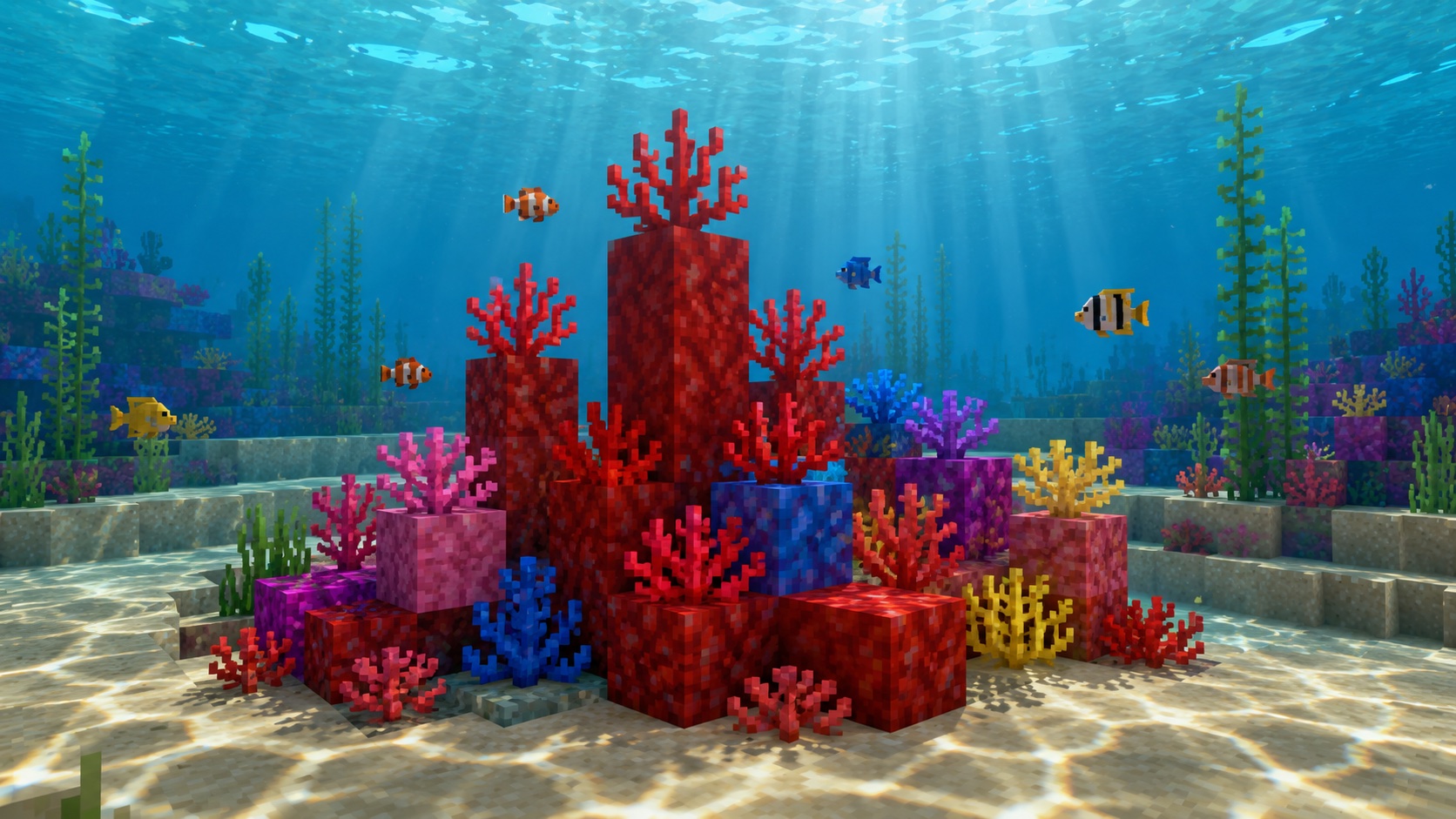
Fire coral is the red member of Minecraft’s coral family. It generates only in warm ocean biomes, as part of coral reefs, and it comes in three living forms: the small upright coral plant, the solid coral block, and the flat coral fan. Each of those has a gray dead counterpart, which gives you six fire coral blocks in total.
The name is misleading. Fire coral doesn’t burn, isn’t flammable, and emits no light. The word just describes the deep red color. The real-world fire coral stings divers; the Minecraft version deals no damage, and you can swim straight through it.
Coral arrived in the Update Aquatic, Java Edition 1.13 and the matching Bedrock release. None of the six fire coral blocks has a crafting use, a redstone function, or a mob interaction. The whole point is decoration, and fire coral is one of the few naturally bright red blocks with an organic texture.
Where fire coral generates
Coral reefs only generate in warm ocean biomes. Warm oceans have the lightest, most turquoise water in the game and are full of tropical fish. Normal, cold, frozen, and lukewarm oceans and every deep variant have no reefs, and neither do rivers or flooded caves.
Inside a warm ocean, look for the colorful clumps on the seafloor. A single reef mixes fire coral with tube coral (blue), brain coral (pink), bubble coral (purple), and horn coral (yellow), in block, plant, and fan forms. Some reefs are heavy on red and others barely have any, so if the first patch is short on fire coral, follow the seafloor to the next one. Reefs often sit shallow enough to free-dive with breath to spare.
Warm oceans are not common in newer worlds. They generate in scattered patches near deserts, badlands, and jungles, so if there isn’t one near spawn, take a boat and scan for the turquoise tint. Reefs don’t despawn or regenerate; a torch on a sand pillar above one marks it for a later trip.
The three living forms
All three living forms generate in the same reefs, need water to stay alive, turn gray when dry, and only drop themselves when mined with Silk Touch. The difference is shape and how they attach to the world.
Fire coral (the plant)
The block simply called fire coral (minecraft:fire_coral) is the short, branching sprig that sits on top of a block. It occupies one block of space but doesn’t fill the cube. It attaches only to the top of a block with a full top face: stone, sand, dirt, planks, and glass all work, while slabs and stairs don’t. It can’t hang from a wall or float in midair, and it pops off if the block underneath breaks.
Coral plants read well up close and disappear at a distance, so use them where players will be standing next to them. The fire variant pokes up higher than the other four, which makes it the natural vertical accent in a mixed reef.
Fire coral block
The fire coral block (minecraft:fire_coral_block) is the full solid cube. In a reef it forms the base that plants and fans grow on. It’s the only one of the three that can support other blocks. Mobs walk and pathfind on it like any solid block, it isn’t transparent, and it will suffocate a mob if you place it inside one.
It has a hardness of 1.5 and needs a pickaxe of any tier to drop anything. Blast resistance is low, so creepers and TNT destroy it like any soft block. Pistons push and pull it normally, and lava next to it does nothing.
Fire coral fan
The fire coral fan (minecraft:fire_coral_fan) is the flat, hand-shaped one. It attaches in two orientations from the same item: aim at the top of a block and it stands up as a floor fan, aim at the vertical side of a block and it pins flat to the surface as a wall fan. In the game data the wall version is a separate block state, minecraft:fire_coral_wall_fan, but you never need a different item. The game picks the right state from where you click.
The support block has to offer a full face. A top slab holds a floor fan, a bottom slab does not, and fences don’t accept fans on their thin top. Break the support and the fan pops off. Because each fan clings to one face, several can share one block of space.
How coral dies and the three dead forms
Every living fire coral piece runs a water check. At least one of its six neighboring positions (north, south, east, west, up, down) must contain water, or the block itself must be waterlogged. When you place coral, or a neighboring block changes, the game rechecks. If there’s no water, a short timer starts and the coral converts to its dead variant, roughly three seconds later in Java Edition. Bedrock uses the same rule; only the visible delay can differ slightly with chunk loading.
Death is one way. Water, neighboring live coral, and bone meal all do nothing to a dead block. That is the only way dead coral is made: a player let live coral dry out, or world generation left a piece of reef exposed to air, usually where a reef breaks the surface near an island or shoreline.
The three dead forms mirror the living ones: dead fire coral (minecraft:dead_fire_coral), dead fire coral block (minecraft:dead_fire_coral_block), and dead fire coral fan (minecraft:dead_fire_coral_fan, with minecraft:dead_fire_coral_wall_fan for the wall state). Each keeps the shape and placement rules of its living version with the color washed out. All five dead coral block types share one gray texture in the world, so a placed dead fire coral block looks the same as a dead tube coral block; only the inventory tracks which is which.
Dead coral stops caring about water. It sits in a desert, the Nether, or a sky base without changing, and underwater without changing too. Dead plants and fans still waterlog, so they work as set dressing inside a filled aquarium.
How to collect each form
The rules differ between living and dead pieces, and between the cube and the two small shapes.
Living coral plant and fan
Both break instantly with any tool or bare hands. A netherite pickaxe isn’t faster than a fist. The tool only matters for the drop: with Silk Touch, the live piece drops itself as an item. Without Silk Touch, it breaks and drops nothing. No dead variant appears, no XP, no item. Any Silk Touch tool works here, since the plant and fan have no required tool, but a pickaxe is the usual choice because you also want it for the coral blocks. Shears don’t substitute for Silk Touch on coral the way they do on leaves, and the dropped items are light, so grab them before the current carries them off.
Living coral block
A live fire coral block needs a pickaxe, and the outcome depends on the enchantment. With Silk Touch, it drops the live red block. With a plain pickaxe of any tier, it drops a dead fire coral block instead. That makes a plain pickaxe a fine way to farm the dead cube and a fast way to waste live coral.
Dead coral block
Any pickaxe, wood through netherite, drops the dead cube; Silk Touch changes nothing at this stage. Bare hands, a sword, an axe, or shears break it without a drop.
Dead coral plant and fan
In Java Edition the dead plant and dead fan follow the same rule as their living versions: Silk Touch drops the item, anything else destroys it. That catches players who assume gray coral is safe to mine bare-handed. Bedrock has been more forgiving about dead fan drops in some versions, so test one piece on your platform before stripping a reef.
Other sources
The wandering trader sometimes sells live coral blocks, including fire coral, for emeralds, but stock is small and the price is high. Bone meal used on the seafloor of a warm ocean can also grow new coral: in Java that produces coral plants and fans mixed with seagrass, and in Bedrock it can generate coral blocks as well. It only works in a warm ocean biome, not in a pool you built yourself. Bone meal on an existing coral piece does nothing, and it never revives dead coral.
For the dive itself, a helmet with Aqua Affinity keeps your mining speed underwater, Respiration or a turtle shell handles breath, and a nearby conduit covers both. Harvest more than you need; a second trip costs more than a stack of extras.
Placement and waterlogging
The plant and both fan states are waterloggable. Place them on a face that’s underwater and they take on the water source as part of the block, which by itself satisfies the water check. Right-clicking a placed plant or fan with a water bucket does the same thing. The coral block is a full cube and can’t be waterlogged; it needs water in a neighboring space instead.
Order matters. Put the water in first, then the coral. If you place live coral on a dry block and reach for the bucket afterward, it’s usually gray before the water lands. This is the most common fire coral mistake.
For a dry room, a few tricks keep coral alive without flooding the space:
- A waterlogged neighbor. Any waterlogged block counts as water for the check, so a waterlogged slab, stair, fence, trapdoor, glass pane, or iron bar next to or under the coral keeps it alive. Panes and bars are nearly invisible at most angles, the cleanest option for coral on a wall or ceiling.
- A hidden water pocket. One water source behind the coral, boxed in by glass or solid blocks, is enough. Keep it a source block so nothing drains it.
- Open water. If the build is underwater anyway, the reef just lives.
Coral can’t go in a flower pot, so there’s no dry indoor shortcut. A piston pushing into a coral plant or fan destroys it with no drop, while coral blocks move normally, and flowing water can wash a plant or fan off its block the way it washes a sapling.
Coral has no light requirement; a sealed dark room with water keeps it alive. None of the six blocks emit light, so add sea pickles or sea lanterns if the reef looks dim.
Uses and building ideas
Live fire coral gives builders saturated red without an industrial texture: a redstone block has wiring lines, red wool has a weave, red concrete is flat. Mixed with horn (yellow) and tube (blue) coral it makes a quick palette with no dyes involved.
The obvious use is an aquarium: a glass tank filled with water sources, sand on the floor, coral blocks as the base, plants and fans on top, sea pickles for light, and a few tropical fish. Underwater cities use the same idea at scale, and fire coral fans lining an underwater approach make a swim-in entrance you can spot from far off.
Out of water (with a hidden water source), the red pieces work as flame accents. A row of coral plants on soul sand or red sandstone looks like fire without the light, coral blocks on a roof or in treetops pop against green leaves, and wall fans on terracotta read as paint splashes or small lanterns.
The dead forms are the stable option. Because they need no water, they go anywhere a torch would go, which makes them the only coral you can use freely above sea level. Good fits:
- Dry reef dioramas, with dead coral blocks stacked against a sandstone cliff and dead plants scattered on top.
- Fossil scenes, where the gray sits well beside bone block, gravel, calcite, and tuff.
- Ghost reefs around a sunken ship, using dead fans placed straight into the water.
- Ruined temples, mixed with mossy cobblestone, sandstone, and skulls.
- Witch huts, with wall fans pinned up as fake dried herbs.
- Cave detail on dripstone, a washed-up coral skeleton on a beach, or flooring that alternates dead coral blocks with prismarine.
Since all five dead cube types look identical once placed, source whichever is easiest; fire coral is common in most warm reefs. For contrast, set the pale gray against deepslate or polished blackstone.
Java vs. Bedrock
The basics match across editions: warm ocean generation, Silk Touch for live coral, the water check, the permanent dead state, and the shared gray texture. The differences are the death timer, a fixed delay in Java that can feel slightly faster or slower in Bedrock depending on chunk loading, and bone meal, which grows coral blocks in Bedrock but only plants and fans in Java. Bedrock can also be quirky about coral status when chunks reload, so glance over an aquarium afterward for new gray patches. A build tutorial from either edition works on the other.
Frequently asked questions
Does fire coral burn or give off light?
No to both. Fire coral is not flammable and has a light level of zero, alive or dead. The name only refers to the color.
Why did my fire coral turn gray?
It lost contact with water. Live coral needs water in one of its six neighboring spaces or inside its own block, and it dies within a few seconds without it. The gray block is permanent, so place a fresh live piece with the water already in place.
Can dead fire coral be brought back to life?
No. Water, bone meal, and neighboring live coral all do nothing. The change runs one direction only.
Do you need Silk Touch to mine dead fire coral?
For the dead coral block, no; any pickaxe drops it. For the dead plant and dead fan in Java Edition, yes, the same as the living versions. Without Silk Touch they break and drop nothing.
What’s the difference between fire coral, fire coral block, and fire coral fan?
Fire coral is the small upright sprig that sits on top of a block. The coral block is the full solid cube it grows on. The fan is the flat piece that attaches to either the top or the side of a block. They are separate items and separate blocks in the game data.
Can you use bone meal on fire coral?
Not on the coral itself. Bone meal on an existing plant, fan, or block does nothing and never revives dead coral. Bone meal on the seafloor of a warm ocean can grow new coral, though.
Does fire coral grow back or spread?
No. Coral never grows back into a mined hole and never spreads on its own. A reef you strip stays bare unless you replant live coral or use bone meal on the warm ocean floor.
One last tip
Treat live fire coral like an underwater flower and dead fire coral like a stone. If a design only needs gray, skip the careful handling: place live coral on dry land, let it die, and mine the result.