What brain coral is and where it generates
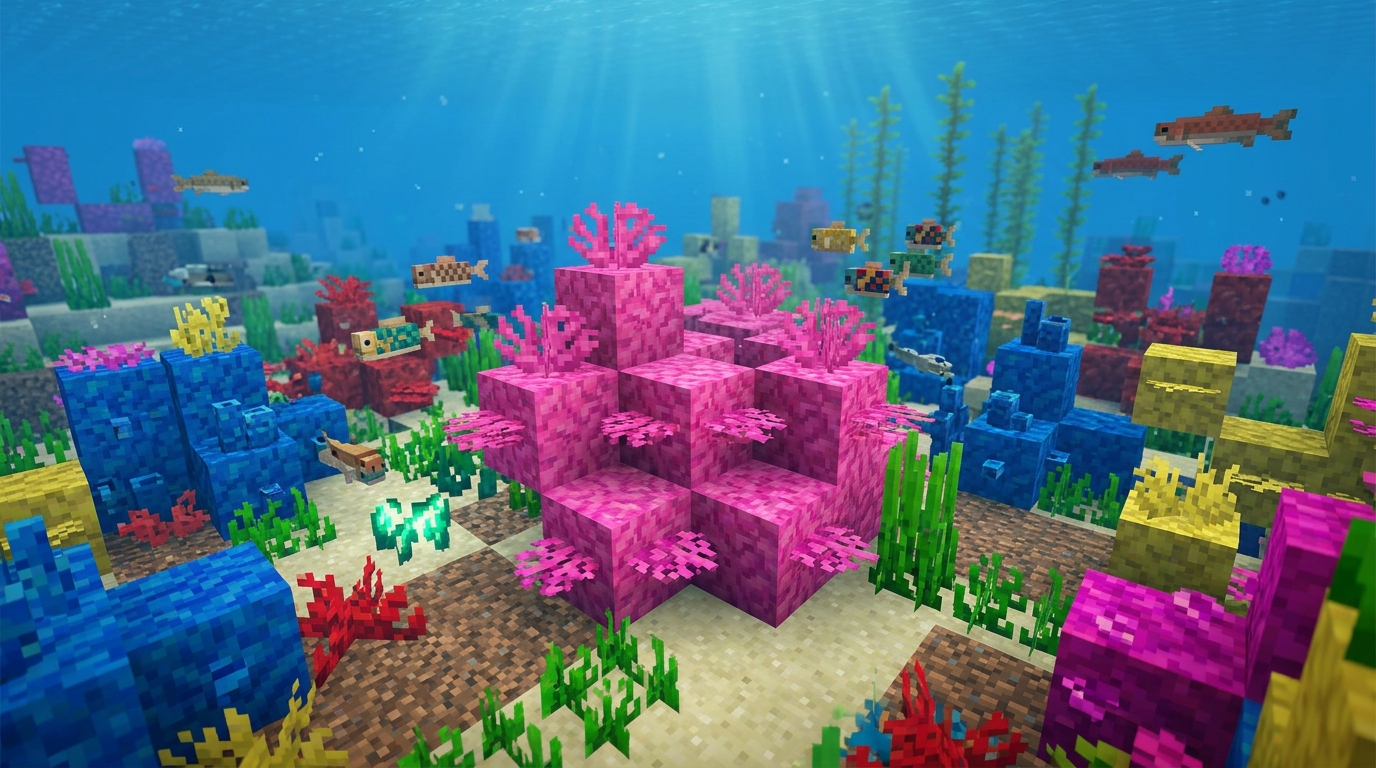
Brain coral is the pink member of Minecraft’s coral family. There are five coral types in the game (tube, brain, bubble, fire, and horn), and each one comes in three living forms: a small upright coral plant, a solid coral block, and a flat coral fan. Each of those has a gray dead counterpart, so “brain coral” is really six blocks that share a name and a texture.
All six generate in coral reefs on the floor of warm ocean biomes. Warm oceans are easy to pick out from a boat: the water has a turquoise tint, the floor is sand, and tropical fish, pufferfish, and dolphins swim around. If the water is dark blue and the only fish are cod or salmon, you are in a regular, cold, or lukewarm ocean and there will be no reef. Cartographers do not sell maps to reefs, but a boat trip along a coast usually turns one up within a few thousand blocks.
Reefs are dense, colorful structures that mix coral blocks, coral plants, coral fans, sea pickles, and seagrass on a sand floor. Brain coral grows in clumps alongside tube, fire, horn, and bubble coral, so a single trip to a reef can stock you with every coral color at once. Coral arrived with the Update Aquatic, released as version 1.13 in July 2018. During the snapshots it was called “pink coral,” which is why some older tutorials still use that name.
The three living forms
The three live forms share a color and a survival rule, but they are separate items with different shapes.
Brain coral (the plant)
Brain coral, block ID minecraft:brain_coral, is the small upright plant with a folded, brain-shaped silhouette. It sits on top of a block and takes up a single space. It has no collision, so mobs and players walk through it, and it does not block light or mob spawning. It breaks instantly with any tool or by hand.
Brain coral block
The brain coral block, ID minecraft:brain_coral_block, is the full solid cube with a swirled pink-and-magenta texture. It is a normal opaque block: you can stand on it, place blocks against it, run redstone dust across the top of it, and it is not affected by gravity. It has a hardness of 1.5 and is mined with a pickaxe. A creeper explosion or a TNT blast will destroy it, so keep coral displays away from mob farms and cannons.
Brain coral fan
The brain coral fan, ID minecraft:brain_coral_fan, is the thin fan-shaped variant that mounts to a surface. Aim at the top of a block and place it and you get a floor fan that stands upright like a small palm leaf; aim at the side of a block and you get a wall fan that hangs flat against it (the wall version uses the block state brain_coral_wall_fan, but there is no separate item). A placed fan cannot be rotated, so for the other orientation you break it and place it again. Fans depend on their support block: if you mine the block a fan is attached to, the fan pops off. When stripping a reef, mine the fans first and the blocks second.
The three dead forms and how coral dies
Dead brain coral (minecraft:dead_brain_coral), the dead brain coral block (minecraft:dead_brain_coral_block), and the dead brain coral fan (minecraft:dead_brain_coral_fan) are the gray versions of the three forms above. The shape stays the same and the pink fades to a chalky gray. All five coral types have dead variants.
Live coral has one rule: at least one of its six neighboring blocks must contain water. For the plant and fan, being waterlogged themselves also counts. If that condition fails, the block turns into its dead variant a few seconds after placement. The delay is short (a random handful of seconds in Java Edition, and Bedrock kills dry coral about as fast), which is why so many players place a pink block on a dry shelf and watch it gray out almost immediately.
The conversion only runs one way. Live turns dead automatically. Dead never turns live again: putting a dead block back in water does nothing, placing it next to living coral does nothing, and no potion, bone meal, or vanilla trick reverses it. Dead coral is inert in every other sense too: it does not spread, decay, or despawn, and it stays as placed until you break it or blow it up.
Naturally generated reefs already contain some dead coral. A reef that pokes into a beach or shallow shore loses its water contact along the edge and dies there, which is why you often see a fully pink reef in deep water and a half-gray one near the coast. Those gray patches are a free supply of dead coral.
How to collect each form
Collection is where most mistakes happen, because the rule changes with each form. The short version is that Silk Touch gets you whatever you mine, every time, and it is the only reliable way to bring live coral home.
Live brain coral and live fans
Both break instantly with anything, including bare hands, but they drop only when mined with a Silk Touch tool. Break a live coral plant or fan with a plain pickaxe, sword, or fist and it vanishes with no drop at all. Any Silk Touch tool works, since the block breaks in one hit anyway.
Live brain coral block
The block needs a pickaxe (wood or better). With Silk Touch, it drops the live pink block. Without Silk Touch, it drops a dead brain coral block instead. The live block is never dropped by a plain pickaxe under any circumstances. Breaking it with your hand or a non-pickaxe tool destroys it with no drop.
Dead brain coral block
The dead block drops itself with any pickaxe, with or without Silk Touch. A golden pickaxe is the fastest, but every tier from wood to netherite works. As with the live block, breaking it without a pickaxe drops nothing.
Dead brain coral and dead fans
The dead plant and dead fan break instantly. In Java Edition they follow the same loot rule as their living versions and only drop with Silk Touch. Bedrock Edition is more forgiving with the dead plant and fan, but a Silk Touch pickaxe guarantees the drop on both editions, so carry one and stop thinking about it. Fortune has no effect on any coral.
Other sources
The wandering trader sells coral blocks, including the brain coral block, for emeralds. He sells blocks only, never the plant or fan. In Java Edition, using bone meal on the seafloor underwater in a warm ocean grows seagrass and sometimes coral plants and coral fans, which makes the small forms renewable without stripping a natural reef. Coral blocks do not grow this way, and bone meal does nothing to dead coral. There is no crafting recipe for any of the six blocks, the stonecutter does not accept them, they are not smelting fuel, and you cannot convert one form into another.
A practical kit for a reef run is a Silk Touch pickaxe, a spare pickaxe, food, a helmet with Respiration and Aqua Affinity, and a conduit if you plan to clear a large area. Inventory fills fast on a reef, so bring space and mark the coordinates for a second trip.
Placement and waterlogging
Placing dead coral is simple. All three dead forms go anywhere: underwater, on dry land, in a cave, in the Nether. The plant needs a block under it and the fan needs a surface to attach to, but neither cares about water. Both can be waterlogged by placing them underwater or by using a water bucket on them after placement, which is handy for aquariums where you want water filling every space while the coral stays put.
Placing live coral takes planning. The block, plant, or fan needs water touching at least one side at all times, and you should assume it will die the moment that stops being true. Draining a room, using a sponge nearby, or opening a wall next to a display all kill coral by accident. Live coral does not decay in your inventory; the timer only starts once it is placed dry.
The useful trick is that waterlogged blocks count as water. A waterlogged stair, slab, fence, chain, sign, or glass pane next to a live brain coral block keeps it alive, so you can hide the water inside the wall of a dry room and keep the pink. To keep live coral alive in a build you can:
- place it fully underwater
- keep at least one side touching a water block
- run hidden water channels behind decorative walls
- put waterlogged stairs, slabs, or panes on the side nobody sees
- build a glass enclosure and flood it for an aquarium wall
- test the layout on a few blocks before committing to a whole room
Use water source blocks rather than flowing water for the hidden supply, so there is no chance of the flow shifting later. And check your hotbar before placing: a live brain coral and a dead brain coral sit next to each other in the inventory, and placing the pink one on land by mistake costs you the block.
One more mechanic worth knowing: a piston can push a coral block like any solid block, but coral plants and fans, live or dead, break when a piston pushes them. Leave them out of moving contraptions.
Uses and building ideas
Coral is purely decorative. It has no redstone behavior beyond the dead block acting as a normal solid block, no growth once placed, no crafting output, and no role in progression. What it offers is a color and an organic texture that nothing else in the palette matches, and the live and dead versions do different jobs.
Live brain coral
Live coral gives you color. The block works for bold sections, the plant and fan add finer detail. They suit coral reef recreations, underwater bases and glass tunnels, aquarium rooms, tropical lagoons, docks, resort builds, fantasy ruins, and alien or magical gardens where a pink lumpy texture reads as strange plant life.
Build in clusters rather than grids. A natural reef is irregular, so group two to four fans, a block or two, some seagrass or sea pickles, and a light source, then repeat with a different coral color. Pair pink brain coral with prismarine, dark prismarine, sea lanterns, glass, sand, and light blue accents for a bright tropical look, or with smooth quartz, calcite, amethyst, and hidden lighting for a softer fantasy palette. Mixing in a few dead pieces keeps a reef from looking flat.
Dead brain coral
Dead coral gives you texture and age. The dead block reads as a gray full block with a swirly surface that breaks up flat walls without looking tiled, and it accepts fans on top like any other block. Good uses include underwater ruins and ancient seafloor structures, sunken ship hulls (at distance the texture passes for barnacled wood), coral graveyards mixed with dead horn fans, weathered pathways where stone feels too sterile, shipwreck interiors and holds, cave and ravine floors that suggest a flooded passage or a fossilized reef, beach and shoreline detailing where the tide has pulled back, witch hut accents, dungeon and boss arena walls, and Nether gardens on soul soil or warped nylium, since dead coral survives the Nether without changing.
Pair the gray with stone, andesite, tuff, deepslate, mossy blocks, dark prismarine, dried kelp blocks, oak fences, and bone blocks. Dead and live brain coral together match calcite and amethyst for more abstract builds. Every reef run produces a few accidental dead pieces anyway, so keep a chest for them.
Java and Bedrock differences
The six blocks behave the same on both editions in every way that matters for building: same warm ocean generation, same one-way death when cut off from water, same waterlogging on the plant and fan, same Silk Touch requirement for live coral, same pickaxe rule for the blocks. Both editions kill dry coral within seconds. The two real differences are the drop rule for the dead plant and dead fan described above, and reef generation, which is tuned slightly differently so a Java reef and a Bedrock reef of the same size will not contain identical mixes of live and dead pieces. Coral mechanics have been stable since 1.13.
Frequently asked questions
Do you need Silk Touch for brain coral?
Yes for every live form. The live plant and fan drop nothing without it, and the live block drops the dead block instead. The dead block drops itself with any pickaxe. For the dead plant and fan, Silk Touch guarantees the drop on both editions.
Why did my brain coral turn gray?
It lost contact with water. Live coral needs water on at least one adjacent side (or to be waterlogged itself, for the plant and fan), and it dies a few seconds after that condition fails. The dead version is permanent.
Can dead brain coral come back to life?
No. There is no item, potion, command in survival, or mechanic that revives dead coral. To get pink coral again, mine a fresh live piece with Silk Touch or find an undamaged one on a reef.
Does brain coral need to be fully underwater?
No. One side touching water is enough, and a waterlogged block counts. That is how builders keep live coral pink inside dry rooms.
Can you craft brain coral or turn one form into another?
No. None of the six blocks have a crafting recipe, the stonecutter does not take them, and the plant, block, and fan are harvested as separate items. If you need a specific shape, look for that exact block on a reef.
Is brain coral renewable?
Partly. The wandering trader sells coral blocks, and on Java Edition bone meal on a warm ocean floor can grow coral plants and fans. For a large build, harvesting a reef with Silk Touch is still faster than either method.
Where does brain coral generate?
Only in coral reefs on the floor of warm ocean biomes. If the water is dark blue, move on until it turns turquoise.
Which form to bring home
Decide before you dive. If the build is a dry ruin, a shipwreck, or anything you do not want to babysit, mine live coral with a plain pickaxe and let the rest die on a stone block by your base; the gray versions are the easiest coral to work with. If you want pink, bring Silk Touch, gather more than you think you need, and design the water supply before you place the first block. The water source matters more than anything else about brain coral.