What is the Glowing effect?
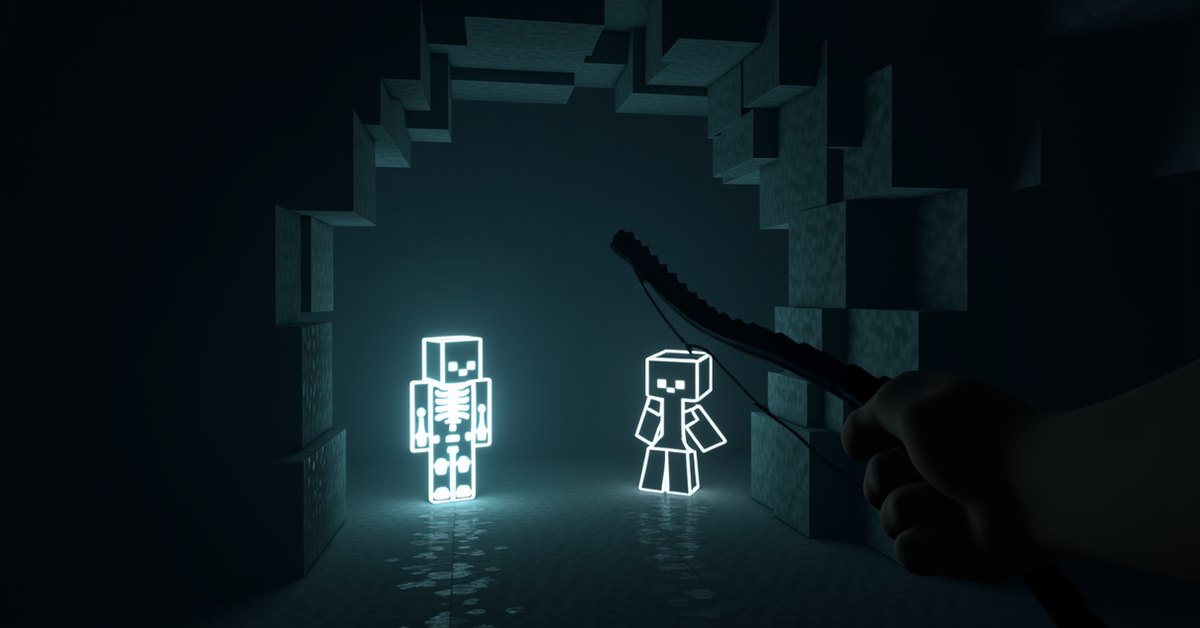
Glowing is a status effect that draws a bright outline around a creature or player. That outline shows through walls, terrain, other mobs, and even total darkness, so anything with the effect is easy to spot from across the map.
By default the outline is white. It doesn’t light up the area, deal damage, or change how the affected entity behaves. It only makes the target visible, which is exactly why map makers and command builders lean on it so much.
The effect has no brewable potion. You can’t make a Potion of Glowing at a brewing stand, so the two normal ways to apply it are spectral arrows and the /effect command.
How to get the Glowing effect
There are two reliable sources, and one of them only exists in Java Edition. Here’s how each works.
Spectral arrows
A spectral arrow applies Glowing for 10 seconds to whatever it hits. You craft them from a regular arrow surrounded by glowstone dust: place one arrow in the center of the crafting grid and four glowstone dust in the slots directly above, below, left, and right of it. That recipe gives you two spectral arrows.
Fire a spectral arrow from any bow or crossbow. When it lands on a mob or player, the glowing outline appears for the full 10 seconds and then fades. Spectral arrows are a Java Edition item, so this method isn’t available in normal Bedrock survival.
Two details save you resources. A spectral arrow shot into the ground can be walked over and picked back up as a spectral arrow, so misses aren’t wasted. And the Infinity enchantment does not apply to them: an Infinity bow still consumes a spectral arrow from your inventory every shot, because Infinity only refunds plain arrows. If you plan to outline a lot of targets, keep a stack on hand.
The /effect command
If you have cheats on or operator permissions, the command works in both editions and gives you full control over duration. The modern syntax is:
/effect give @p glowing 30
That applies Glowing to the nearest player for 30 seconds. Swap @p for @e to target every entity, or use a mob’s target selector to light up specific creatures. To clear it early, run /effect clear @p glowing. Older versions used the shorter form /effect @p glowing 30, so if the command errors out, check which syntax your version expects.
The command also takes two optional numbers after the duration: an amplifier and a hide-particles flag. For Glowing, the amplifier is pointless because the effect has no stronger tier, but the last argument still matters. Writing /effect give @p glowing 30 0 true applies the outline while hiding the swirling effect particles, which keeps the target from looking obviously buffed. That small touch is handy in adventure maps where you want the outline without tipping the player off that a command fired.
What Glowing actually does
The whole point of the effect is visibility. Once an entity is glowing, its outline renders on your screen no matter what’s between you and it. A creeper hiding behind a hill, a player sneaking through a cave, an item frame on the far side of a wall: all of them light up.
The outline follows the shape of the entity’s hitbox model, so a tall mob like an Enderman gets a tall outline and a small mob like a chicken gets a small one. The effect ignores the amplifier value. Running the command with a higher level does nothing visual, because there’s no stronger version of “you can see it.”
Glowing also doesn’t reveal invisible entities in a useful way on its own, with one exception worth knowing: an invisible mob that is also glowing will show its outline, which is a common trick for tracking invisible creatures in custom maps.
The outline renders at full brightness on your client, which means it never dims with distance or lighting the way a normal mob does. That’s what makes it readable at the edge of your render distance or deep in an unlit cave. It also passes through the entity’s own model, so even a mob turned away from you shows a complete silhouette rather than a partial one.
Where the Glowing effect is useful
Outside of custom maps, players still find real uses for it. On a survival server, tagging a fleeing enemy with a spectral arrow keeps them visible while they try to break line of sight around corners and over hills. In hardcore exploration, outlining a mob you want to farm helps you relocate it after a fight scatters everything.
Command builders get the most mileage. A single /effect command can mark every hostile mob in an area, turn quest givers into obvious beacons, or highlight a hidden item frame that holds a puzzle clue. Because the effect doesn’t touch the world or the mob’s stats, it’s a safe way to guide players without changing anything they can interact with.
Changing the outline color
The white outline isn’t fixed. In Java Edition, the color comes from the scoreboard team an entity belongs to, so you can recolor it by assigning the target to a team with a set color.
First create a team and give it a color:
/team add glowteam/team modify glowteam color red
Then add the entity to that team:
/team join glowteam @p
Now any Glowing outline on that player renders red instead of white. Map makers use this to color-code factions, quest targets, or hidden objects. Bedrock Edition doesn’t use the same team-color system, so outlines there stay their default color.
Tips and common mistakes
A few things trip people up with this effect.
- Spectral arrows and glowstone blocks are unrelated. You need glowstone dust for the recipe, not the solid block, so break the block down first or trade for dust.
- The effect is short by default. A spectral arrow only gives 10 seconds, so if you want a mob outlined for a long time, use the command with a big duration instead.
- Higher levels do nothing. Don’t waste time stacking amplifiers; Glowing II looks identical to Glowing I.
- The outline can be hard to see against a bright sky or matching background. White outlines read best in caves and at night.
Java vs. Bedrock differences
Most of the effect behaves the same across both editions, but two things don’t. Spectral arrows exist only in Java Edition, so Bedrock players rely on the command to apply Glowing. And team-based outline colors are a Java feature, so recoloring the outline isn’t possible in Bedrock. In both editions the base effect looks and works the same: a white outline visible through blocks.
Frequently asked questions
Can you make a Potion of Glowing?
No. There’s no brewing recipe for it in survival. The effect comes from spectral arrows or the /effect command, not from a potion.
How long does the Glowing effect last?
A spectral arrow applies it for 10 seconds. With the command you set the duration yourself, from a single second to as long as you want.
Does Glowing help you find mobs in caves?
Yes. Because the outline shows through solid blocks, a glowing mob is visible even through stone, which makes it useful for tracking a specific creature underground.
Why is my glowing outline white instead of the color I set?
The color comes from the entity’s scoreboard team in Java Edition. If the outline is white, the target either isn’t on a team or is on a team with no color assigned. Set a team color with /team modify and make sure the entity has joined that team.
Do glow squids give the Glowing effect?
No. Glow squids drop glow ink sacs, which you use for glow item frames and dyed glowing signs. They have nothing to do with the Glowing status effect.
Does the Glowing effect work on players in multiplayer?
Yes. A spectral arrow or command applied to another player outlines them for everyone who can normally see that outline, which is why it shows up in a lot of PvP and hide-and-seek maps.
Can you get Glowing in survival without commands?
In Java Edition, yes: craft spectral arrows and hit the target. That’s the only survival source, and it lasts 10 seconds per hit. In Bedrock survival there’s no item that applies it, so you’re limited to worlds where cheats are on.
Does Glowing work on item frames and armor stands?
Yes, when applied through the command with a selector that targets them. Both are entities, so they take the effect and show an outline, which map makers use to point players toward specific frames or displays.
Worth trying
If you build custom maps or run a server, Glowing is one of the most useful effects for guiding players without changing the world itself. Set up a colored team, point the command at your quest mobs, and you have a clean way to mark targets that reads through any wall.